

Mobile App Development React Native: Pros, Cons & Costs
You're probably in one of three situations right now. You've got an app idea and want to know whether it's commercially sensible. You've been quoted for separate iPhone and Android apps and the numbers feel heavy. Or you've heard the term React Native tossed around by developers and want someone to explain what it means in business terms, not engineering shorthand.
That's where most Australian small and mid-sized businesses start. They don't need a lecture on frameworks. They need to know whether a mobile app will help them sell, service, book, retain, or streamline. Then they need a delivery model that doesn't create two expensive products, one for Apple and one for Android, unless there's a strong reason to do it.
What Is React Native and Why Should Your Business Care
A common Australian SME scenario looks like this. The business wants one app customers can use, but the first proposal comes back as two separate builds, two budgets, and two maintenance streams. That usually turns a sensible digital project into a larger investment than the business expected.
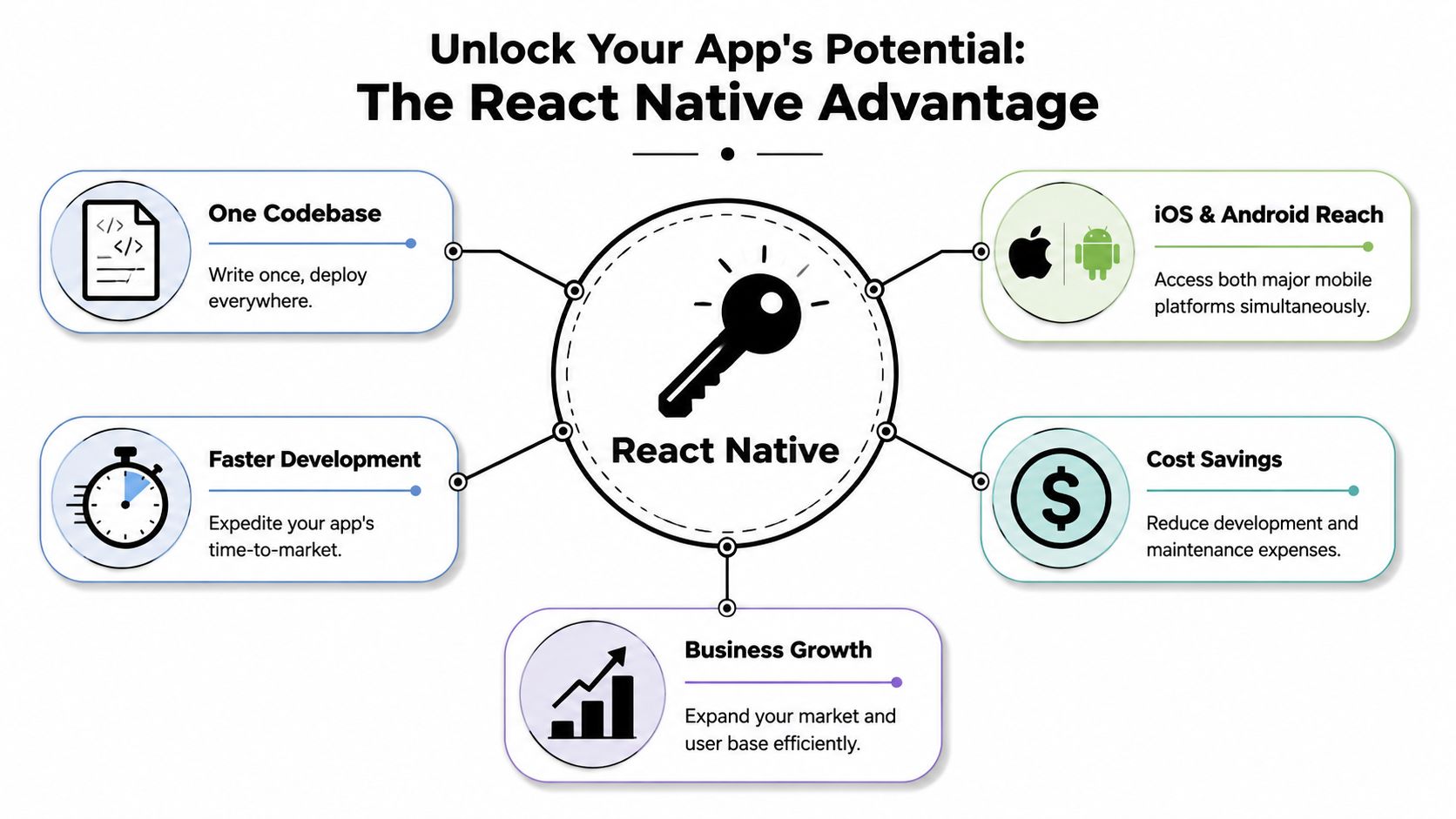
React Native is one of the main ways to reduce that duplication. It lets developers build iPhone and Android apps from a largely shared codebase, which means the same product can reach both markets without starting from scratch twice. For a business owner, that matters less as a technical detail and more as a budget and delivery decision.
Why businesses pay attention to it
The commercial appeal is straightforward. If your app includes bookings, customer accounts, service requests, ordering, messaging, staff workflows, or member access, much of that logic can usually be built once and reused across both platforms. That often reduces build time, lowers maintenance effort, and makes feature releases easier to coordinate.
For many SMBs, that translates into a practical advantage. You can put more of the budget into the parts customers notice, such as user experience, integrations, and business process design, instead of funding duplicate development work.
That is why React Native often suits businesses that want to test demand, launch an MVP, or improve operations without committing to two separate native teams from day one. Businesses comparing mobile application development services for Australian companies usually find React Native sits in the middle ground between cost discipline and app quality.
What your business actually gets
React Native is still app development, not a shortcut dressed up as one. Customers download a real mobile app. Your team can still use common mobile features such as push notifications, camera access, location services, logins, payments, and integrations with your existing systems.
From a business point of view, the value usually comes through in four areas:
- Lower duplication: shared features are not rebuilt separately for iPhone and Android
- Faster release cycles: updates can often be planned and shipped in one coordinated stream
- Simpler product management: one roadmap is easier to govern than two drifting products
- Better early-stage economics: budget can go toward validation and growth instead of parallel builds
For a non-technical owner, the simplest comparison is this. Building two native apps from the start is like fitting out two separate stores at once. React Native is closer to using one strong operating model, then adjusting the front window where needed for each location.
Where the trade-offs sit
React Native is a strong option, not an automatic answer.
If the app depends on advanced 3D graphics, very heavy animation, deep hardware access, or unusual platform-specific behaviour, native development can still make more sense for part or all of the product. In those cases, forcing everything into one shared approach can create delays later. Good delivery teams avoid ideology. They use shared code where it saves real time and cost, and they add native work where performance or user experience requires it.
That balanced view is one reason many business owners start here when weighing app models. For a plain-language comparison of those options, see Cleffex insights on mobile app types.
If your goal is to launch a useful app, control spend, and keep future changes manageable in the Australian market, React Native deserves serious consideration.
Choosing Your App Development Path
Picking an app approach is less about what's fashionable and more about fit. Most businesses are really choosing between three paths. React Native, fully native development using Swift for iOS and Kotlin for Android, or a Progressive Web App that behaves more like an app in the browser.
The right answer depends on what you're trying to achieve, how quickly you need it, and how much complexity your app carries.
The short commercial view
If you need broad mobile reach without funding two separate builds, React Native often lands in the middle ground. It usually offers a stronger mobile experience than a PWA and a leaner delivery path than building two native apps from day one.
That position is easier to trust because the ecosystem is mature. A Coursera overview of React Native adoption cites figures showing 38% of global developers used React Native for cross-platform apps in 2021, and 13.62% of professional developers preferred it in 2022. It also notes that React Native held more than 13% market share and ranked as the second most favoured cross-platform mobile framework. For an Australian SME, that matters because adoption reduces hiring risk and broadens the available talent pool.
React Native vs Native vs PWA at a Glance
| Criterion | React Native | Native (iOS/Android) | Progressive Web App (PWA) |
|---|---|---|---|
| Build approach | One shared codebase for both major platforms | Separate codebases for iOS and Android | One web-based product accessed in a browser |
| Speed to market | Usually faster than building two native apps | Usually slower because work is split across platforms | Often quickest for simpler use cases |
| Initial cost profile | Balanced for most SMB app projects | Usually highest because duplication is greater | Often lower upfront for lighter requirements |
| User experience | Strong mobile experience with native UI patterns | Best fit for platform-specific polish | Good for browser-led experiences, less app-like in some cases |
| Performance ceiling | Strong for most business apps | Best for highly intensive interactions | Depends heavily on browser constraints |
| Access to device features | Good, with selective native modules when needed | Full direct access | More limited than app-store apps |
| Maintenance model | Shared updates where possible | Ongoing parallel maintenance | Web maintenance model, simpler in some cases |
| Best fit | SMBs wanting reach, speed, and app-store presence | Complex or highly specialised apps | Content, portals, simple self-service tools |
What usually works best for SMBs
A local retailer, clinic, service business, or membership organisation usually doesn't need the most technically pure solution. They need the most commercially sensible one.
Use this filter:
- Choose React Native when you want an app in the Apple App Store and Google Play, need good device integration, and want to avoid building everything twice.
- Choose native when product performance, advanced interactions, or platform-specific behaviour are central to the experience.
- Choose a PWA when your main goal is lightweight access, browser convenience, and app-store distribution isn't essential.
Native is often the premium route. It isn't automatically the best route.
If you want a plain-English comparison of where web, native, and hybrid options sit, Cleffex insights on mobile app types offer a useful outside perspective.
For businesses comparing delivery options in the local market, it also helps to look at broader mobile application development services in Australia so you can match the model to your actual goals rather than to a developer's personal preference.
The React Native App Development Lifecycle
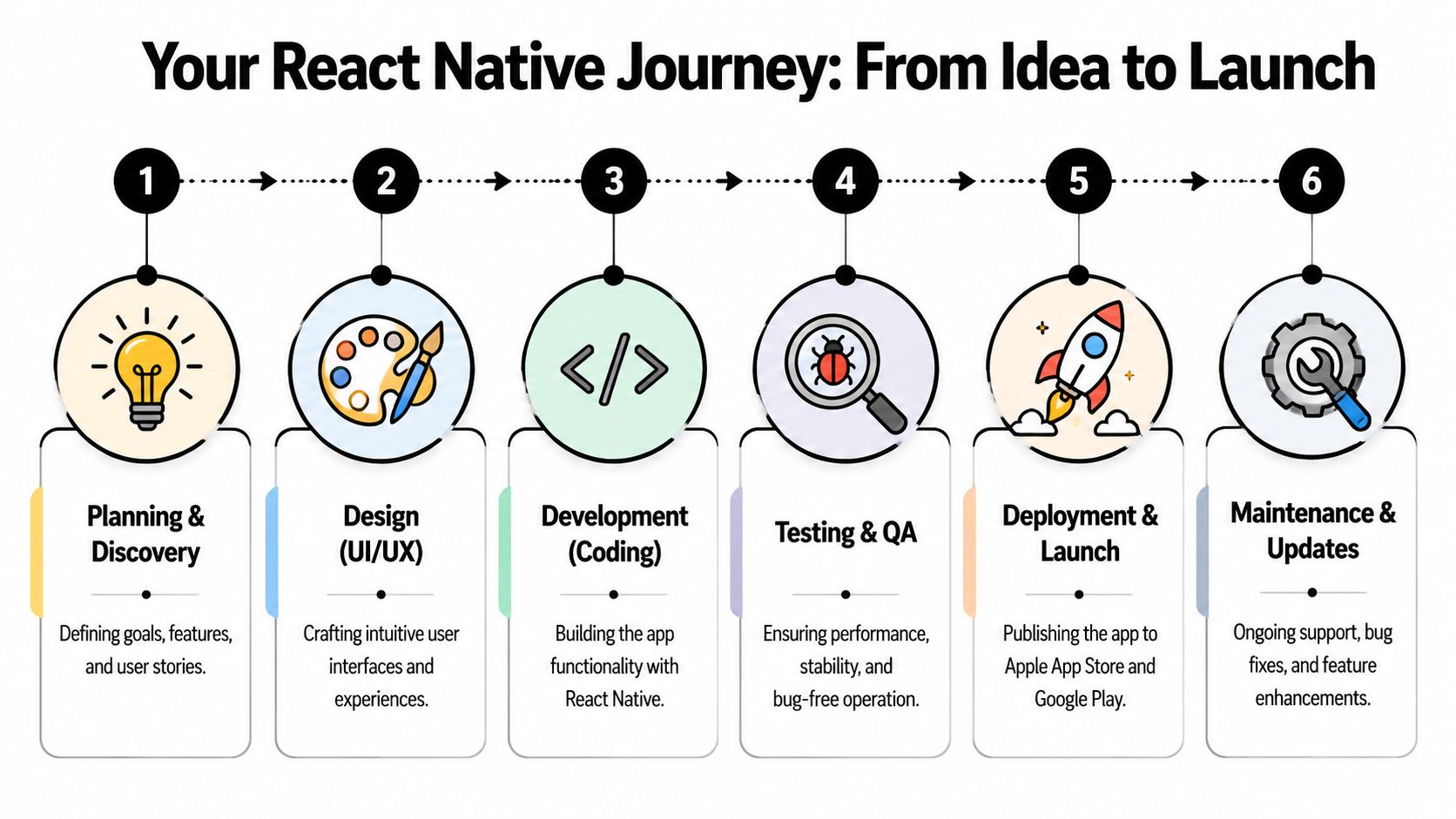
A lot of Australian business owners start an app project with one reasonable concern. How do you know where the money is going from month to month, and whether the build is progressing?
A well-managed React Native project should answer that clearly. You should be able to see what is being decided, what is being built, what is being tested, and what is still waiting. If the process feels vague, budgets usually drift and launch dates tend to slip.
Discovery before design
The first stage is commercial, not visual. Before anyone gets excited about screens and colours, the team needs to define what the app is for, who it serves first, and what the first release must include.
For an SMB, this is usually where the biggest savings happen.
A good discovery phase forces practical decisions early:
- What does the app do better than your mobile website?
- Who is the first priority user, customers, staff, members, or franchise partners?
- Which actions matter most, booking, ordering, tracking, paying, messaging, or scanning?
- Which systems need to connect, such as Shopify, WordPress, Xero, Stripe, or your booking platform?
That sounds simple, but it changes everything. I've seen businesses ask for loyalty tools, chat, advanced reporting, and multiple user roles in one first release, then realise half of it could have waited. The result is usually a longer build, a messier user experience, and higher support costs after launch.
Design and project setup
Once the scope is defined, the team turns that plan into wireframes, interface designs, and a working project setup. In plain English, these steps transform ideas into something you can review and challenge before the expensive build work accelerates.
React Native projects also need the right foundation. That includes setting up the codebase, device testing tools, release environments, and the rules for how new features will be added. Good setup reduces rework later, especially if the app will grow over time or need several people working on it.
If you want a broader view of the mobile app development process, that guide gives a useful high-level comparison point alongside a React Native project.
Here's a helpful visual walkthrough of the delivery journey in video form:
Development, device features, and testing
This stage is where business owners often assume the team's efforts amount to "building the app". In practice, it is a cycle of development, review, fixes, and testing across different phones and operating systems.
A typical React Native build includes:
- Shared feature development: account areas, forms, booking flows, product screens, notifications, and content modules are built in the shared codebase.
- Native feature integration: if the app needs the camera, maps, payments, push notifications, or location services, those need to be configured properly for both Apple and Android.
- Testing on real devices: a screen that behaves well in a simulator can still break on an older Samsung or a smaller iPhone.
- Performance tuning: image handling, long lists, and heavy user flows need attention so the app stays responsive in day-to-day use.
This matters for SMBs because poor testing is expensive. Every bug found after launch costs more to fix than one caught during development, and customer patience disappears quickly if login, checkout, or booking flows fail on their device.
The projects that hold up best are usually the ones with tighter scope control and better testing discipline, not the ones that looked fastest in week one.
Store submission and post-launch support
Launch is an approval and operations step, not just a technical handoff. Apple and Google both require store listings, screenshots, privacy details, app category decisions, and compliance checks. If any of that is rushed, release dates can move.
After the app is live, the work changes rather than stopping. Users report issues. Devices update. Operating systems change. New feature requests come in. A business that treats launch as the finish line often ends up with an app that becomes harder and more expensive to maintain.
That is why smart owners plan for version two before version one is even submitted. The goal is not just to get into the app stores. It is to build something your team can afford to improve over the next 12 to 24 months.
If you want a practical view of what users now expect from modern mobile products, this guide to mobile app trends and design best practices is a useful reference point.
Estimating Timelines and Costs in Australia
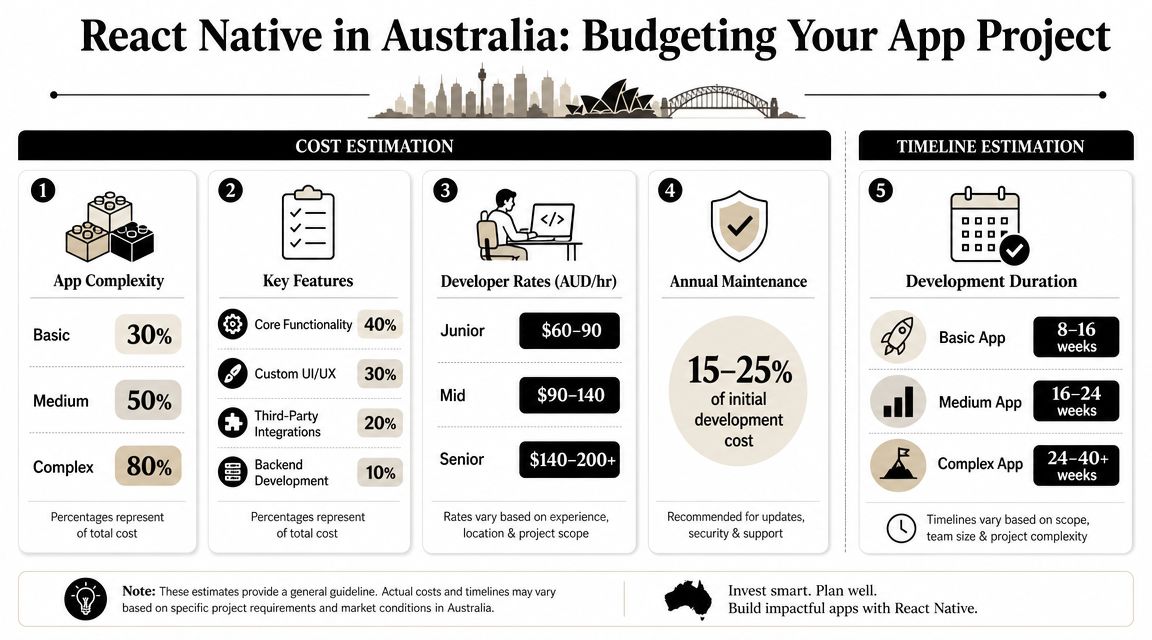
This is usually the point where business owners want a clean answer and the honest one is less tidy. React Native can reduce duplicated effort, but app costs still depend heavily on scope. The biggest budget swings don't usually come from the framework itself. They come from what the app needs to do.
If you ask three agencies for pricing and the quotes vary wildly, the difference often sits in what each one assumed about features, integrations, backend systems, testing depth, and post-launch support.
What drives cost up
Some apps look simple from the outside and are expensive underneath. Others look polished but are structurally straightforward. The difference is usually hidden in the moving parts.
Watch these budget drivers closely:
- Custom workflows: quoting systems, multi-step bookings, approvals, subscriptions, or role-based dashboards add complexity quickly.
- Integrations: Shopify, CRMs, payment gateways, accounting tools, booking systems, and internal databases each add coordination and testing work.
- Backend requirements: if the app needs its own admin panel, database, API, or customer logic, the project expands beyond front-end screens.
- Design ambition: custom UI can be worth it, but highly bespoke design takes longer to build and test than standard patterns.
- Device features: camera, maps, geolocation, file uploads, and notifications can be routine, but they still need careful implementation.
How to think about timeline bands
Instead of chasing false precision, it's better to group projects by delivery shape.
| App type | Typical scope | Timeline pattern | Budget pattern |
|---|---|---|---|
| Lean MVP | Core login, a small number of screens, basic integrations, focused use case | Shortest path to market | Lowest complexity and usually the clearest ROI test |
| Mid-range business app | Customer accounts, notifications, booking or ordering logic, admin-connected features | Moderate delivery cycle | Broader design, integration, and QA effort |
| Complex platform app | Multiple user roles, deep integrations, advanced data flows, heavy backend dependency | Longest timeline | Highest delivery and maintenance demands |
That framing helps because Australian businesses often ask the wrong first question. They ask, “What does an app cost?” The better question is, “What version of the problem are we solving first?”
If your first release tries to satisfy every stakeholder, your app will cost more, take longer, and launch with more risk.
A better budgeting approach
A practical budgeting conversation usually starts with a staged plan:
- Launch the minimum feature set that proves user demand.
- Build only the integrations needed for real usage.
- Reserve budget for QA, store submission, and post-launch fixes.
- Keep room for version two once customer behaviour is visible.
If you're already pricing broader digital work, it also helps to compare app budgets against wider website design cost expectations in Australia, because many businesses are choosing between improving a website, launching a portal, or building a dedicated app.
React Native often wins when the business case needs app-store presence without the burden of parallel full-native builds. That doesn't make it cheap. It makes it more economically sensible for the right use case.
Building Your Australian App Development Team
A common Australian SMB scenario goes like this. The business owner has budget approval, a rough app idea, and pressure to get moving. Then a key question arises. Who is going to build, test, release, and maintain this thing six months from now?
That decision affects cost, speed, and risk as much as the framework choice.
React Native projects rarely fail because the codebase started in the wrong language. They usually fail because responsibility is blurred. One person designs, another builds, someone else handles the backend, and no one clearly owns QA, app store submissions, or post-launch fixes.
In-house team
An internal team gives you control and keeps product knowledge inside the business. That matters if the app supports a core service, internal workflow, or a long-term digital product you plan to improve year after year.
The trade-off is hiring breadth. Even a relatively modest app needs more than a single developer. You still need design judgment, testing discipline, release management, backend planning, and someone making scope calls when competing priorities show up. If you want a realistic view of how broad modern software development roles can be, that breakdown is a useful reference.
For many SMBs, the in-house model looks cheaper on paper than it is in practice. Salaries, recruitment time, management overhead, and the risk of one key person leaving can quickly outweigh the benefit of direct control.
Freelancers
Freelancers suit tighter projects. A pilot app, a feature extension, or a short-term gap in delivery can all work well with the right specialist.
I'd only recommend this path if the scope is clear and someone inside the business can manage it properly. Otherwise, the owner ends up acting as product manager, QA lead, and traffic controller without meaning to. That is where delays start.
Continuity is the bigger issue. If one freelancer built the app, another changed the API, and nobody documented the release process, even small updates can become expensive. The hourly rate may look attractive, but handover risk is real.
Agency model
For many Australian businesses, an agency is the safer commercial choice because it packages the full delivery function into one team. Strategy, UX, development, QA, deployment, and support run on the same process.
That usually reduces coordination problems and gives you one point of accountability. It also helps when the app needs to work with existing systems such as CRMs, booking tools, payment platforms, or internal admin software. Those integration points often create more business risk than the app screens themselves.
The trade-off is cost. Agencies are rarely the cheapest line item. They can, however, be the lower-cost option over the life of the app if they prevent rework, missed requirements, and messy rebuilds later.
What to judge beyond the quoted price
Business owners often compare day rates and stop there. A better comparison is operational ownership.
Ask these questions before choosing any team:
- Who writes and approves the scope?
- Who handles testing across devices and operating systems?
- Who submits updates to Apple and Google?
- Who fixes bugs after launch, and under what terms?
- Who owns the source code, accounts, and documentation?
- Who can keep the app stable if the original builder disappears?
Those answers tell you more than a proposal total.
A practical rule of thumb
Choose in-house if the app is becoming part of your core capability and you expect ongoing product development.
Choose freelancers if the project is narrow, well-defined, and you already have strong internal oversight.
Choose an agency if you need structured delivery, broader capability, and a clear support path after launch.
The mistake I see most often is hiring for build only. An app is not a one-time brochure. It needs updates, compatibility checks, store compliance work, and someone accountable when something breaks.
Real-World Examples from Australian Businesses
A business owner in Brisbane greenlights an app because jobs are being missed in the field. A café group in Melbourne wants more repeat orders without paying more to reach the same customers through social platforms. A retailer in Perth already has online sales and wants a better mobile buying experience for regular customers. These are the kinds of commercial decisions that make React Native worth considering.

A Brisbane trades business
A plumbing and maintenance company needs technicians to receive job details, take site photos, update status, and write notes before leaving the property. The commercial goal is simple. Reduce admin lag, cut errors, and give the office cleaner information to invoice and follow up faster.
React Native suits this type of app because the workflow is largely the same on iPhone and Android. The business is paying for one main product stream instead of funding two separate builds from day one. For an SMB, that usually means a shorter path to launch and a more manageable support bill.
The trade-off is that field apps often rely heavily on phone features such as camera access, location, and background syncing. That needs careful planning early. If those parts are treated as an afterthought, the savings from cross-platform development can disappear into rework.
A Melbourne café group
A café business with several locations wants a loyalty app with offers, purchase history, and push notifications. The app does not need novelty. It needs to give regular customers a reason to come back more often and make promotions easier to run across multiple venues.
That is often a good fit for React Native because the value sits in account logic, rewards, ordering links, and message timing. The business can test offers, refine the customer journey, and keep one product roadmap across both platforms.
For operators in hospitality, this matters. Margins are tight, marketing budgets are rarely unlimited, and a custom app only pays off if it supports repeat revenue.
The strongest app projects usually improve an existing business process people already use.
A Perth retailer
A retailer with an established ecommerce site wants an app for browsing products, logging in, saving preferences, and checking out on mobile. The website still matters for search and first-time discovery. The app serves a different job. It gives existing customers a faster way to buy again.
React Native can make sense here because the business is extending an existing sales channel, not inventing a new one from scratch. Product data, customer accounts, and promotions can often be connected into one app experience without building separate iPhone and Android products in parallel.
There is still a commercial decision to make. If the roadmap depends on highly custom mobile interactions or unusually complex performance demands, native development may justify the extra spend. For many Australian retailers, though, React Native is the more practical first move because it lowers delivery overhead while still producing a polished customer app.
The common thread
These businesses look different, but the buying logic is similar:
- the app solves a clear operational or revenue problem
- the business already understands who will use it and why
- speed to market matters, but so does long-term maintainability
- the owner wants one sensible delivery path, not duplicated effort across two platforms
That is where mobile app development react native tends to earn its keep for Australian SMBs. It is a commercial choice as much as a technical one. Used in the right scenario, it can reduce upfront cost, shorten timelines, and give a business a credible mobile product without overcommitting too early.
Frequently Asked Questions for Business Owners
Can React Native work with my existing website
Usually, yes.
If your website already runs on WordPress, Shopify, WooCommerce, or a custom CMS, a React Native app can often connect to the same product data, customer accounts, bookings, or content through APIs and integrations. In practice, the key issue isn't whether React Native can connect. It's whether your current systems expose the right data cleanly and securely.
A website and an app also don't need to do exactly the same job. Many businesses get better results when the website handles discovery and SEO, while the app focuses on repeat use, logged-in actions, saved preferences, or customer service tools.
Is React Native only good for MVPs
No.
It's often chosen for MVPs because it supports leaner delivery, but that doesn't mean it's limited to early-stage products. The important question is whether the app's needs match the strengths of the framework.
If the product is centred on bookings, customer accounts, ecommerce, service workflows, notifications, internal operations, memberships, or field data capture, React Native can be a long-term fit. If the product demands highly specialised performance or unusually platform-specific interactions, native development may still be the better long-term path.
Will the app feel like a “real” mobile app
It can, if it's built properly.
This point confuses a lot of non-technical buyers because cross-platform gets wrongly equated with “cheap hybrid”. React Native apps use native UI building blocks, so they can feel polished and familiar to users on both platforms.
What hurts quality usually isn't the framework. It's weak UX design, rushed testing, oversized assets, slow data handling, or trying to force every feature through a one-size-fits-all implementation.
What kind of features usually work well in a React Native app
The sweet spot is business functionality that benefits from mobile convenience.
Typical examples include:
- Bookings and scheduling: service bookings, appointment reminders, and status updates
- Customer accounts: saved details, order history, loyalty profiles, or member dashboards
- Notifications: promotions, reminders, updates, and re-engagement prompts
- Commerce flows: browsing, account access, carts, and checkout support
- Field operations: forms, job notes, image capture, and location-aware tasks
Apps like these usually gain the most from a shared cross-platform build.
What doesn't work as well
The weak fit tends to be apps where the primary value comes from advanced graphics, extremely intensive performance demands, or unusual device-level behaviour that differs sharply between iOS and Android.
That doesn't automatically rule React Native out. It just means the project needs a more careful architecture and a realistic understanding of what should remain shared versus what should be handled natively.
How much maintenance does a React Native app need after launch
More than many owners expect.
An app isn't finished when it appears in the store. It needs bug fixes, OS compatibility checks, dependency updates, performance reviews, content changes, and occasional store compliance work. If it integrates with third-party systems, those systems can also change underneath it.
Many app budgets become unrealistic here. The build gets approved, but nobody has planned for the ongoing work that keeps the product stable.
Maintenance is part of app ownership, not an optional add-on.
Is React Native easier to maintain than two native apps
Often, yes in broad terms, because a shared codebase reduces duplication.
But “easier” doesn't mean effortless. You're still maintaining a mobile product that depends on libraries, operating systems, app-store rules, and integration layers. A cross-platform setup can reduce the amount of parallel work, but it still requires organised support.
For a small or medium business, the smarter question is usually this: who is responsible for maintenance, and how quickly can they respond when something breaks?
Can React Native use phone features like camera, maps, and payments
Yes, and this is one of the reasons it works well for many business apps.
A strong React Native build often keeps the shared business logic in one place and uses native modules where direct device capability matters. That's a practical middle ground. You get broad efficiency without giving up the features customers expect from a proper mobile app.
Is React Native a safe long-term choice
For many businesses, yes.
The framework is mature, widely used, and backed by a large ecosystem. The primary risk usually isn't the technology disappearing. It's choosing the wrong app strategy, overbuilding version one, or launching without a support plan.
If the app solves a real business problem, has clear ownership, and is built with sensible architecture, React Native is often a strong long-term commercial choice for Australian SMBs.
Should I build an app at all, or improve my website instead
That depends on how people use your business.
Improve the website first if your biggest need is visibility, search traffic, lead generation, and general access to information. Build an app when users need repeat interactions, account-based convenience, mobile-specific workflows, or faster access to actions they perform regularly.
A lot of businesses don't need an app immediately. They need a sharper website, better conversion flow, and clearer digital priorities. But once repeat engagement becomes central, an app can become a valuable second layer.
What should I prepare before asking for a quote
Come to the conversation with clarity on five points:
- The main business problem the app solves
- The user group you want to serve first
- The must-have features for version one
- The systems the app needs to connect to
- Who will own the app after launch
That level of preparation makes quotes more comparable and advice much more useful.
If you're weighing up whether React Native is the right path for your business, Website Builder Australia can help you assess the commercial side before you commit to build. Their Brisbane-based team works with Australian businesses on websites, ecommerce, and mobile app projects, with local support that covers planning, development, hosting, and ongoing maintenance.


