

A Guide to Flawless Domain Name Transfer for Australian Businesses
At its core, a domain name transfer is just the process of shifting your website's address from one registrar (your current provider) to a new one. Think of it like changing your energy provider – you keep the same house, but a different company manages the service. It's crucial to see this move as a strategic business decision, not just another technical chore.
Why a Domain Name Transfer Is a Smart Business Decision

For Australian small and medium-sized businesses, your domain name is far more than a simple web address; it's a foundational digital asset. While it’s tempting to just stick with the registrar you first signed up with, you could be missing out on some serious benefits. This isn't about fixing something that's broken. It's about fine-tuning a vital part of your online operations for better performance and simpler management down the track.
Many businesses eventually find their initial provider no longer fits their needs as they grow. The decision to switch almost always comes down to practical, bottom-line reasons that can directly impact your day-to-day work and future plans.
Common Reasons for a Domain Transfer
Most of the time, the push to move a domain comes down to cost, support, or convenience. What was perfectly fine when you were starting out might now be a frustrating bottleneck. Maybe your current provider's renewal fees have quietly crept up, or you've discovered their support team is nowhere to be found during Australian business hours.
Here are a few common scenarios we see all the time:
- Bringing Everything Together: Juggling your website hosting, domain registration, and business emails across three different companies is a headache. A transfer lets you consolidate everything under one roof, which means simpler billing and a single point of contact for support.
- Getting Better Support: When something goes wrong with your site, you need help, and you need it fast. Moving to a registrar known for excellent, local support can save you hours of stress and prevent costly downtime.
- Accessing Better Features: Your business goals might now demand features your current registrar just doesn't offer. This could be anything from advanced DNS management tools to better security like two-factor authentication or easier integration with other platforms.
- Finding a Better Price: While it's not always the number one reason, saving money on annual renewals definitely adds up, especially if you own a few domains. A transfer can lock in more competitive pricing for the long haul.
The Growing Trend in Australian Domain Management
The Australian market is definitely showing a trend towards more active domain management. Domain transfers often mirror economic activity, and the .au namespace has proven to be incredibly resilient. The number of registered .au domains continues to rise, with auDA data projecting an all-time high of 4,294,913 by the end of 2025. This growth reflects past surges, like the 27.4% jump between 2023 and 2024 that saw more businesses transferring domains as they shifted to providers who could better support their performance goals. You can dig into more of these trends and explore the official .au domain statistics.
A domain name transfer is a proactive step toward gaining tighter control, better security, and streamlined management of your most important online asset. It's about aligning your domain with a partner that supports your business goals.
Ultimately, making the switch is a forward-thinking move. It sets your business up for greater efficiency and ensures the very foundation of your online presence is solid, secure, and looked after by a partner who genuinely understands what you need.
Your Essential Pre-Transfer Readiness Checklist
Getting a domain transfer right is all about the prep work. If you take a few key steps before you even think about hitting that "start transfer" button, you'll dodge the most common headaches and make sure the whole thing goes off without a hitch. Think of it as your pre-flight check; sorting these things out now saves a world of pain later.
The very first, most important job is to check your contact information. Specifically, your administrative contact email listed in the public WHOIS database. This is the only email address that will receive the transfer authorisation messages. If it’s an old one you can't access, the transfer is dead in the water before it even starts.
Jump into your current registrar's dashboard and find the domain management area. Look for your contact or WHOIS details and double-check that the admin email is correct and active. If it's wrong, update it immediately. Just be aware that this can sometimes kick off a 60-day transfer lock, which we'll get into next.
Understanding the 60-Day Transfer Lock
One thing that often catches people out is the 60-day transfer lock. This isn’t a setting from your registrar; it’s a security rule from ICANN, the organisation that governs domains globally. The lock automatically stops a domain from being transferred for 60 days after two specific things happen:
- You've just registered a brand new domain.
- You've changed the registrant's contact details (name, organisation, or email).
This rule is there to stop someone from hijacking your domain right after an ownership change. If your domain is fresh or you’ve just updated the details, you’ll have to wait out the 60 days. There are no shortcuts, so it's vital to factor this into your timing.
Confirming Your Domain is Unlocked
By default, registrars put a lock on your domain to shield it from dodgy transfer attempts. Before you can move it, you have to go in and manually take this lock off. You'll usually find this setting in your domain’s security or management panel.
It’s often a simple toggle or a button that says something like "Unlock Domain" or "Disable Registrar Lock." Flipping this switch tells the global registry that you've given the green light for the move. Forgetting this tiny step is one of the top reasons a domain name transfer gets rejected straight away.
Pro Tip: Don't leave your domain unlocked forever. Once you’ve kicked off the transfer with your new provider, keep an eye on its progress. As soon as it's complete, log into your new registrar and make sure the lock is back on for peace of mind.
Securing Your EPP Code
The last piece of the puzzle you need is the EPP code, sometimes called an Authorisation Code or Auth Code. Think of it as a unique, single-use password for your domain that proves you have permission to transfer it. You’ll need to give this code to your new registrar to get the ball rolling.
You can typically grab the EPP code from the same spot in your registrar’s dashboard where you unlocked the domain. Some will show it right on the screen, while others will email it to the administrative contact for security. This is yet another reason why having an up-to-date admin email is so crucial.
Once you’ve got your EPP code, treat it like a password. It’s the key to your domain, so only share it with your new registrar when you're ready to start the process. Of course, picking the right new home for your domain is a big decision. You can check out our guide on the best domain registrars in Australia to help you choose.
To make things even easier, run through this quick checklist before you start.
Domain Transfer Readiness Checklist
This table gives you a quick-glance summary of the essential checks to ensure you're ready to go.
| Checklist Item | Status (Ready / Not Ready) | Action Required |
|---|---|---|
| Domain is > 60 days old | If newly registered, wait until the 60-day period has passed. | |
| Registrant Info Changed > 60 days ago | If recently updated, wait until the 60-day lock expires. | |
| Administrative Contact Email is Accessible | Log in to your current registrar and verify/update the admin email address in your WHOIS info. | |
| Domain Privacy/WHOIS Guard is Disabled | Turn off privacy protection temporarily so registrars can verify ownership details. | |
| Registrar Lock is OFF (Domain is Unlocked) | Find the "Domain Lock" setting in your control panel and switch it to "Unlocked". | |
| EPP / Authorisation Code has been Received | Request the code from your current registrar; check your admin email if it's sent there. |
With your contact info updated, the domain unlocked, and your EPP code in hand, you are fully prepped for a smooth and successful transfer.
Navigating the Actual Domain Transfer Process
Alright, with your prep work done and dusted, you’re ready for the main event. This is where the magic happens, and honestly, it’s much less intimidating than it sounds. The whole domain name transfer is really just a coordinated hand-off between your old registrar and your new one, with a few key nudges from you to get it started and keep it rolling.
Think of it in two parts. First, you'll kick things off with your new provider, and then you’ll wait for the confirmation process to play out. Let's walk through exactly what you need to do at each stage.
Initiating the Transfer with Your New Registrar
Your journey starts on your new registrar’s website. Look for an option like "Transfer a Domain" – it’s usually pretty prominent. Here, you'll punch in the domain name you’re moving and, most importantly, that EPP code (or Authorisation Code) you snagged earlier.
The EPP code is basically the secret handshake that proves you have the authority to move the domain. Submitting it is your way of telling the global domain system, "Yep, this is mine, and I approve this transfer." This one action is what officially sets the whole process in motion.
The All-Important Authorisation Email
After you’ve submitted the transfer request with your EPP code, the next move is a waiting game, but not for long. Within a few hours, keep an eye out for an authorisation email. This will be sent to the administrative contact email listed in your domain's WHOIS record, acting as a final security check to prevent anyone from hijacking your domain.
This email has one job: to get you to click a confirmation link to give the final go-ahead. Responding to this email as soon as you see it is the single best thing you can do to keep the transfer zipping along. If you miss it or ignore it, the transfer request will eventually time out and you’ll have to start all over again. Bummer.
Expert Tip: Before you even start the transfer, do yourself a favour and add your new registrar's email address to your contacts or safe senders list. You'd be surprised how often that crucial authorisation email ends up in a spam folder. It’s a simple step that can save you a world of headaches.
If you don’t spot the email within 24 hours, check your spam or junk folders first. Still no luck? Log back into your current registrar's dashboard to make sure the admin email on file is correct. Some new registrars also have an option to resend the email, which can be a lifesaver.
What Happens Behind the Scenes
Once you click that approval link, the official cogs start turning. Your new registrar takes your request, now fully authenticated by the EPP code and your email confirmation, and sends it to the central domain registry. For .com domains, that’s an organisation called Verisign; for our local .au domains, it's auDA.
The registry then pings your old registrar to let them know a transfer is pending. From this point, your old provider usually has up to five days to release the domain. Most will just let the clock run out and approve it automatically, unless there’s a legitimate reason to block it, like a fraud flag or a 60-day transfer lock.
This waiting period is precisely why a standard domain transfer takes between five to seven days. It’s not an instant switch; it's a formal, automated process designed with security buffers.
This diagram breaks down the initial steps you need to nail to get the ball rolling smoothly.
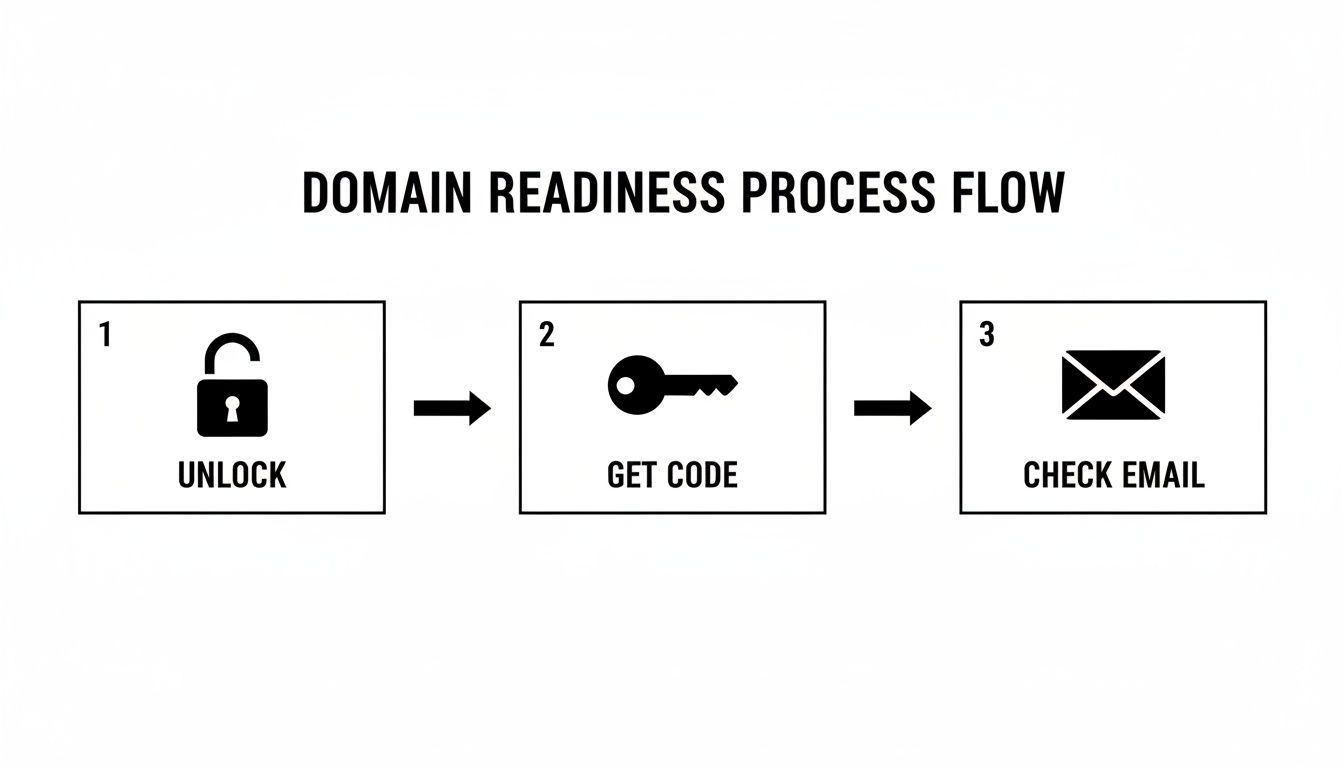
Get these three things right, and the rest of the process shifts over to the registrars and registries to complete.
Planning Your Transfer Timing
Since the process can take a few days, a little planning goes a long way. The best time to start is during a quieter period for your business. Kicking off a transfer on a Friday afternoon or just before a public holiday is asking for trouble if you need to contact support. A Tuesday morning is usually a safe bet, giving you the whole business week to keep an eye on things.
In the Australian domain space, this is a well-trodden path. According to auDA, the total number of .au registrations hit a massive 4,294,913 by December 2025, a 1.5% increase year-on-year. This huge number shows just how many local businesses are actively managing their online assets, often doing a domain name transfer as part of a website refresh or hosting change.
It's also important to know that we're talking about changing your registrar. If you need to change the legal owner of the domain, that's a different kettle of fish often called a "change of registrant." For a complete guide on that process, check out this excellent How To Transfer Domain Ownership Step By Step Guide.
And one last critical piece of advice: never, ever let your domain expire mid-transfer. If it expires while the transfer is pending, it can fall into a "redemption period," which is a bureaucratic nightmare that can stall or even kill the transfer entirely. Make sure you have at least two weeks of registration left before you start. You can get more tips on managing your .au domain in our other articles.
Keeping Your Website and Email Live During the Switch

Let’s be honest, the biggest worry for any business owner doing a domain name transfer is the nightmare scenario where everything just… stops. Website down. Emails not coming through. It's a recipe for lost sales and unhappy customers.
But it absolutely doesn't have to be that way. With a bit of prep work, you can make the entire switch happen in the background with zero downtime. It's not magic, it's just a matter of understanding one crucial detail: your domain registrar and your DNS host aren't always the same thing.
Think of it like this: the registrar is the company that holds the 'deed' to your domain name. The DNS (Domain Name System) host, on the other hand, is the traffic controller. It tells visitors where to find your website and directs emails to your inbox. While one company can do both jobs, they are separate roles. This separation is your key to a seamless transfer.
The Secret Sauce: A Proactive DNS Setup
The best way to guarantee a smooth ride is to copy your DNS settings to your new registrar before you even click the "transfer" button. This is the cornerstone of a zero-downtime move. It means that the second the transfer is complete, your new provider is already holding the right map to direct all your traffic.
Here's what that looks like in practice:
- Grab a copy of your current DNS records. Log in to your existing provider and find the DNS management area. You should see an option to export your records. This gives you a complete blueprint of your setup—A records, CNAME, MX, the lot.
- Rebuild the records at your new registrar. Now, head over to your new provider. Before you initiate the transfer, find their DNS tools and either import the file or manually re-create every single record from your old provider.
- Check your work. Then check it again. This step is critical. A tiny typo in an IP address can send your website traffic into the void, and a mistake in an MX record will blackhole your emails. Be meticulous.
Once your DNS settings are perfectly mirrored, you can start the transfer process with confidence. When it finalises (usually in 5-7 days), the internet will simply start asking the new registrar for directions instead of the old one. Because the directions are identical, nothing breaks.
Don't Forget Your Email!
For most of us, email is just as mission-critical as the website. If you're using a service like Google Workspace or Microsoft 365, the key is to get your MX (Mail Exchange) records right. These are the specific DNS records that tell the world's email servers where to deliver your mail.
As you're copying your DNS settings, pay extra attention to these MX records. Services like Google provide very specific values and priorities that must be entered exactly as they instruct. Get this right, and your email flow will continue uninterrupted.
The core principle for a zero-downtime transfer is preparation. By configuring DNS at your new provider ahead of time, you eliminate the risk of service interruption. The switch becomes a background administrative task, not a disruptive live event.
For businesses moving their website hosting at the same time, it’s vital to get the sequence right. It’s well worth learning how to migrate website to a new host without downtime, as this process goes hand-in-hand with a successful domain transfer.
What to Expect During the Transfer Window
While you're in that 5-7 day waiting period, don't panic. Your domain will continue to use your old registrar’s nameservers. This means your website, email, and everything else will function completely normally. There’s no blackout period where your domain is offline.
The actual changeover, once all the approvals are done, is practically instant. The moment your new registrar takes control, it starts answering DNS queries. And because you did all the prep work, it's giving out the correct answers from the very first second. You can find more practical advice for keeping things running smoothly in our other posts on website maintenance. This proactive approach turns a potentially stressful event into a controlled, predictable, and seamless update.
Solving Common Domain Transfer Problems

Even when you've ticked every box, a domain transfer can sometimes hit a snag. It's frustrating, no doubt, but nearly every issue has a straightforward fix once you know what you’re looking for. Let’s walk through the common bumps in the road and get your transfer back on track.
The most common alert you'll see is "Transfer Rejected." Your first instinct might be to panic, but this is usually just a simple oversight from the prep phase. The rejection message itself is often your first clue to solving the puzzle.
Why Your Transfer Might Be Rejected
A rejected transfer almost always comes back to one of a few usual suspects. Before anything else, log back into your old registrar’s control panel and run through your checklist one more time.
Nine times out of ten, the rejection is due to one of these things:
- The Domain is Still Locked: This is the number one culprit. Registrars lock domains by default to stop unauthorised transfers. You have to manually unlock it before kicking off the process.
- Incorrect EPP Code: The Authorisation (or EPP) code is case-sensitive and basically acts as your domain's password. Even a single typo will get it rejected instantly.
- Domain Privacy is Active: Some privacy services can block the transfer by hiding your contact details or, worse, stopping that critical authorisation email from ever reaching you.
- The Domain is in a 60-Day Lock Period: If you’ve only just registered the domain or recently changed the registrant's contact info, there’s an ICANN-mandated 60-day lock that prevents any transfers.
Once you’ve spotted and fixed the issue—whether it's unlocking the domain or grabbing a fresh EPP code—you can simply restart the transfer process with your new provider.
Your old registrar is obligated to give you a clear reason for rejecting a transfer. Look for a notification in their dashboard or check your email. That message is your best diagnostic tool.
The Missing Authorisation Email
Another classic headache is when the authorisation email just never shows up. Without clicking the confirmation link in that email, your transfer is stuck in limbo. This almost always boils down to an issue with the administrative contact email on file for the domain.
If the email is missing in action, here’s what to do:
- Check Your Spam Folder: It sounds obvious, but you’d be surprised how often these automated emails land in junk.
- Confirm the Admin Email Address: Log into your current registrar and double-check the administrative email in your domain’s WHOIS details. Is it an old address you don't check anymore? Update it immediately.
- Resend the Email: Most new registrars have a handy button in their transfer status panel to resend the authorisation email.
Once you've got access to the right inbox, you should be able to find the email, approve the transfer, and get things moving again.
What to Do If the Transfer Stalls
So, you've done everything right, but the transfer status has been stuck on "Pending" for days. What gives? A typical domain name transfer takes five to seven days to complete, but sometimes it feels like it’s fallen into a black hole.
This kind of delay often happens because some registrars don’t automatically approve outgoing transfers. Instead, they’ll wait the full five-day period allowed by ICANN, maybe hoping you’ll change your mind and stay. If this is the case, patience is really your only option.
However, you can sometimes give it a nudge. Some registrars have an option in their control panel to explicitly approve a pending transfer. Have a look for a "Pending Transfers" section and see if you can give it a manual push. If not, and you’re past the seven-day mark, it’s time to get in touch with the support teams at both your old and new registrars to see where the holdup is.
Your Top Domain Transfer Questions Answered
Even with a step-by-step guide, it's completely normal to have a few questions swirling around. Let's tackle some of the most common queries we hear from Aussie business owners when they're looking at a domain name transfer. Getting these cleared up will help you move ahead without any second-guessing.
We’ve pulled together the big ones that pop up time and time again, from SEO worries to the real story on costs and timing.
Will Transferring My Domain Name Hurt My Website's SEO?
This is a big one, and the short answer is no. A domain transfer itself is purely an administrative change and has no direct impact on your SEO. Think of it like changing the company that manages your property's title deed—the house itself (your website content, authority, and history) doesn't change. Search engines are interested in your domain's long-term reputation, not who you pay for registration.
However, problems can arise if the technical side of the move is mismanaged. The real danger is messing up your DNS settings. If your nameservers aren't pointed correctly at your new registrar before the transfer goes through, your site could go offline. Search engines can penalise a site for being unavailable, which might lead to a temporary drop in rankings.
The key is to follow a zero-downtime strategy. By getting your DNS records set up at your new provider in advance, the transfer becomes invisible to Google and, more importantly, to your customers.
How Much Does a Domain Transfer Cost in Australia?
A domain transfer is rarely free, but the cost isn't just an admin fee. For most registrars in Australia, you can expect to pay a fee that's roughly the same as a standard one-year renewal for your domain type (like .com.au or .com).
Here's the good bit: this fee isn't just for the paperwork. Under the rules set by ICANN (the organisation that governs most domains), this transfer cost must include a mandatory one-year extension of your domain's registration. This year is added on top of your existing expiry date.
Let's say your domain expires in March 2025. If you transfer it in January 2025, your new expiry date will automatically become March 2026. You're essentially just paying for your next renewal a bit early and getting the transfer process included.
Can I Transfer a Domain That Has Already Expired?
Honestly, you really don't want to let it get to this point. Once a domain officially expires, it enters a "grace period" (usually about 30 days), and during this time, most registrars lock it down, preventing any transfers. Your only move is to renew it with your current provider.
If you miss that window, it gets much worse. The domain then enters a "redemption period." Getting it back from here is incredibly expensive, and transfers are completely off the table.
The safest bet is to always start your domain name transfer at least two to four weeks before it's due to expire. If it's already past the expiry date, your first and only action should be to renew it immediately. Once it’s active again, you can go ahead and start the transfer.
Ready to make the switch to a reliable Australian partner? At Website Builder Australia, we make domain transfers simple and seamless, ensuring your website and emails stay online throughout the process. Get in touch with our Brisbane-based team today to consolidate your digital assets with a provider who understands your business.


