

What Is a Content Management System and Why It Matters in 2026
Ever found yourself wanting to update your website but hitting a wall because you don't know how to code? That’s where a content management system (CMS) comes in. At its core, a CMS is a piece of software that gives you a control panel for your website, letting you create, manage, and publish digital content without touching a single line of code.
Think of it as the keys to your own digital shopfront. You can change the window display, update your opening hours, or add a new special to the menu, all by yourself.
What Is a Content Management System in Simple Terms

Let’s use an analogy. Imagine your business website is a brand-new house. Without a CMS, every time you wanted to hang a picture, paint a wall, or even move a couch, you'd need to call in the builders with their complex blueprints. It’s slow, expensive, and completely impractical for small changes. That’s what it's like trying to run a website without a CMS—every tiny text update requires a developer.
A CMS completely changes the game. It’s like having a smart-home control panel and an interior design toolkit all in one. Instead of needing a builder, you get a simple, visual interface to make all the changes yourself. The system cleverly keeps your content (the text, images, and videos) separate from the website’s design and structure.
The Two Core Components of a CMS
So, how does it actually work? A CMS is made up of two distinct parts that work together to bring your website to life. Getting your head around these two sides is the key to understanding its power.
The Backend (Content Management Application): This is your private admin area, your digital workshop. It’s where you and your team log in to create, edit, and organise everything. Writing a new blog post, uploading product photos, or scheduling a sale announcement for next week all happens here, often in an editor that feels as simple as using Microsoft Word.
The Frontend (Content Delivery Application): This is the public side of your website—the polished, finished version that your customers see and interact with. The backend takes all the content you’ve created and uses pre-set templates to display it beautifully on the frontend, ensuring everything looks professional and consistent on every single page.
This separation is the real magic. It empowers your team to focus on creating fantastic content without ever worrying about accidentally breaking the website's design or functionality. For a small Aussie business, this means you can update your business hours, publish a new customer story, or launch a promotion in minutes, not days.
A great CMS puts the power back in your hands. It turns a static, developer-dependent website into a dynamic marketing tool that you can update instantly to jump on new opportunities.
While most people think of a CMS for managing text and images, there are also specialised platforms for specific needs. If video is a big part of your marketing, for instance, a dedicated video content management system offers advanced tools to help you organise, stream, and even make money from your video library.
Ultimately, a CMS provides a clear, simple answer to the question "what is a content management system?". It's a tool that removes the technical headaches from managing a website, making your digital life a whole lot easier.
The Core Benefits a CMS Brings to Your Business

Putting a content management system in place is far more than just a tech upgrade. Think of it as a strategic business move that delivers real, measurable value. For a small or medium-sized business, a CMS acts as a force multiplier, saving precious time and money while opening the door to new growth.
Essentially, it turns your website from a static, digital brochure into a dynamic marketing engine.
The most immediate win is empowering your team. Your marketing crew can instantly launch new campaigns, publish blog posts, or update service pages without needing to call in (and wait for) a developer. This smashes through bottlenecks and gives you the agility to react to market changes on the fly.
This newfound freedom has a direct impact on your bottom line. Instead of funnelling money to a developer for every minor text change, you can reallocate that budget towards activities that genuinely grow your business, like marketing and finding new customers.
Streamline Your Content and Boost Your SEO
A quality CMS brings much-needed structure and efficiency to your content creation. With built-in tools, you can set up clear workflows for drafting, reviewing, and publishing. This gets everyone on the same page, from your copywriter to the business owner, ensuring a smooth process from start to finish.
This organised approach also gives your Search Engine Optimisation (SEO) a massive leg-up. Most modern platforms come loaded with features specifically designed to help you climb the ranks on Google.
- Easy Meta Tag Editing: Effortlessly tweak page titles and descriptions to hit your target keywords.
- Clean URL Structures: Create simple, readable web addresses that both people and search engines love.
- Automatic Sitemaps: Generate and submit sitemaps to Google, helping it discover and index your pages much faster.
- Image Optimisation: Easily add alt text to your images, a crucial factor for accessibility and getting found in image searches.
By taking the pain out of these essential SEO tasks, a CMS helps you consistently improve your online visibility and attract more organic traffic, all without needing to be an SEO whiz.
A CMS ensures your brand's voice and visual identity remain consistent across every single page. By using templates and pre-defined style guides, you guarantee that every new piece of content automatically aligns with your branding, building trust with your audience.
Secure Your Digital Asset and Future-Proof Your Business
Website security is, rightly, a massive concern for any business. The good news is that reputable CMS platforms like WordPress are backed by huge global communities of developers. These experts are constantly working to find and patch security holes, keeping your site safe.
Regular updates and a wide array of security plugins are your first line of defence, helping to protect your digital storefront from threats.
This focus on security and scalability is a key reason why CMS adoption is surging locally. In the bustling Australian digital space, the content management software market hit USD 606.2 million in 2024 and is forecast to reach USD 1,349.7 million by 2030. This growth is overwhelmingly driven by Aussie SMEs—which make up 99.8% of all businesses—ditching outdated static sites for dynamic CMS platforms to run everything from blogs to full-blown e-commerce stores. You can dig into the specifics of these market projections from Grand View Research.
Ultimately, choosing the right CMS is about future-proofing your business. It gives you a scalable foundation that can grow alongside you, letting you add new features like e-commerce, membership areas, or advanced integrations as your needs change. This makes a content management system a seriously smart investment for any business looking to thrive online.
Comparing the Main Types of Content Management Systems
Trying to understand the world of content management systems can feel a bit like choosing a car. You know you need one to get your business moving, but the options—from a reliable family sedan to a heavy-duty delivery truck—all serve very different needs. It's the same with a CMS; not all are built alike.
Getting your head around the three main types—Traditional, Headless, and SaaS—is the first real step to picking the right engine for your business. Each one strikes a different balance between control, flexibility, and pure convenience.
Traditional CMS: The All-in-One Solution
The one most people are familiar with is the Traditional CMS, sometimes called a coupled or monolithic system. Think of giants like WordPress or Drupal. This model is a neat, all-in-one package, bundling the backend (where you manage your content) with the frontend (the website your customers see).
Imagine it’s a classic local bakery. The kitchen where you bake the bread (your backend) is directly attached to the shopfront where you sell it (your frontend). This setup is incredibly handy for straightforward websites.
- Best for: Blogs, portfolio sites, and standard business websites for service pros like electricians or local consultants.
- Key Advantage: It’s a self-contained unit, making it fairly simple to get up and running for a single website.
- Main Drawback: That tight integration can also be its biggest weakness. Pushing content to a mobile app or a smart device is often clunky and requires a lot of customisation, if it's even possible.
For many Aussie small businesses, a traditional CMS is the perfect place to start. It gives you a user-friendly way to run a professional website without needing a deep technical background.
Headless CMS: The Flexible, Content-First Approach
Next up is the Headless CMS, a more modern and seriously flexible way of doing things. Here, the content storage (the ‘body’) is completely separated from the presentation layer (the ‘head’). It does one job and does it brilliantly: managing content.
This is like having a central kitchen that creates amazing food but has no dining room of its own. Instead, it uses an API to deliver that food to any ‘dining room’ that asks for it—be it a website, a mobile app, a digital billboard, or an in-store display.
A headless CMS gives you ultimate flexibility. You create content once in a central hub and can then deliver it to any device or platform you can dream of, without having to rebuild a thing.
This approach is perfect for brands that need a consistent message across many different channels. A retailer, for instance, can update a product description once in their headless CMS, and that change will pop up instantly on their website, their Android app, and their iOS app.
SaaS and Ecommerce Platforms: The Managed Service
Finally, we have Software-as-a-Service (SaaS) and dedicated ecommerce platforms like Shopify or BigCommerce. These are fully managed, all-inclusive solutions where the provider handles all the technical heavy lifting—hosting, security, updates, you name it.
Think of it as leasing a fully-kitted-out retail space in a busy shopping centre. You get a ready-to-go shop with built-in tools for payments, inventory, and shipping, while the centre management handles all the security and upkeep. You can just focus on selling your products.
You do trade some of the deep-level customisation you’d get with a system like WordPress, but the payoff is sheer convenience and peace of mind. For businesses that are all about selling online, these platforms are often the fastest and most reliable way to get going. You can see how these options compare in our guide on the best website builder for small business.
Traditional vs Headless vs SaaS CMS At a Glance
To help you get a clearer picture, here’s a simple table breaking down how these three CMS types stack up against each other based on what matters most to a business. This comparison should help you decide which architecture best suits your needs for flexibility, ease of use, and future growth.
| Feature | Traditional CMS (e.g., WordPress) | Headless CMS (e.g., Contentful) | SaaS/Ecommerce CMS (e.g., Shopify) |
|---|---|---|---|
| Best For | Standard websites, blogs, portfolios | Multi-channel brands, apps, IoT | Online stores, retail businesses |
| Flexibility | Moderate; tied to a single website | Very High; content goes anywhere | Low; locked into the platform's ecosystem |
| Ease of Use | High (for non-developers) | Low; requires developer expertise | Very High; designed for beginners |
| Control | High; full control over code and hosting | High; full control over frontend | Low; provider manages the platform |
| Scalability | Good, but can be complex | Excellent for content delivery | Excellent, with tiered pricing plans |
Each type has its own strengths and is designed for a different kind of business. The key is to match the platform's capabilities with your own business goals and technical comfort level.
Essential CMS Features Your Business Needs in 2026
Picking a content management system is a big decision. Knowing what features to actually look for is what separates a smart investment from a future headache. As we look towards 2026, the right platform needs to do more than just hold your content—it should be a core part of your growth engine.
To help you make a solid choice, let's break down the non-negotiable features a modern CMS must have.
First and foremost is an intuitive content editor. Gone are the days of clunky, confusing interfaces that required a degree in computer science to use. A modern CMS should feel as simple as writing an email, giving your team the power to create and update content without needing a developer on speed dial.
Look for a block-based editor, like the one that WordPress made famous. This approach lets you build pages using "blocks" for text, images, videos, and customer testimonials. It’s a visual, drag-and-drop system that makes creating beautiful, well-structured pages incredibly straightforward.
Secure Collaboration and Workflow Management
As your team grows, you need a system that can handle multiple users without compromising security. This is where granular user roles and permissions become absolutely critical. A good CMS will let you assign specific roles—like Author, Editor, or Administrator—to each person on your team.
This means you can give your marketing intern the ability to draft blog posts but stop them from publishing content live. It ensures your site manager has the keys to the kingdom, while a guest writer can only touch their own work. This level of control is vital for security and preventing those accidental "oops" moments that could take your site offline.
Another lifesaver is version control, or revision history. Think of it as a time machine for your website. If someone publishes an update with a glaring mistake, you can instantly roll back to a previous, correct version in just a couple of clicks. It saves you from costly downtime and a whole lot of stress.
Built-In SEO Tools and Integrations
A CMS without strong SEO tools is like a ute without an engine—it might look the part, but it’s not going to get you anywhere. Your platform must come with a suite of built-in tools designed to help you climb the rankings on search engines like Google.
Here are the must-have SEO features to look out for:
- Editable Meta Information: The power to easily change page titles and meta descriptions for every single page, post, and product.
- Customisable URLs: Simple, clean web addresses that are easy for both people and search engines to understand.
- Automatic XML Sitemaps: A feature that creates a map of your site and sends it to Google, helping it find and index your content much faster.
- Image Alt Text Fields: An easy way to add descriptive text to your images, which is a big deal for accessibility and ranking in image searches.
Beyond SEO, your CMS has to play nicely with the other software that runs your business. A healthy app ecosystem and powerful API integrations are what turn your CMS from a simple website tool into a central command centre. This allows it to connect seamlessly with your CRM, email marketing platform, and analytics tools, creating a smooth flow of data across your entire operation.
Successfully managing your content goes beyond just having the right tools; it relies on following essential content management best practices to keep everything running smoothly. This is especially true when dealing with different content types across multiple platforms, a challenge that a flexible system like a headless CMS in Australia can solve.
A modern CMS should act as the central hub for your entire digital marketing stack. Seamless integration ensures that your website, customer data, and marketing campaigns all work together in perfect harmony.
For businesses that rely heavily on photos and videos, Digital Asset Management (DAM) is another key feature. The Australian market for DAM, a vital CMS extension for handling rich media, was valued at USD 88.9 million in 2024 and is projected to hit USD 412.4 million by 2033. For retailers and marketers, this reflects the urgent need to manage high-quality images and videos for multi-channel campaigns, especially with 60% of Australian web traffic now coming from mobile.
How to Choose the Right CMS for Your Australian Business
Picking a content management system isn't just a tech decision; it's a major business move. Get it right, and you've got a powerful engine for growth. Get it wrong, and you’re stuck with a frustrating and expensive roadblock.
To make a smart choice, you need to look past the shiny features and get real about what your business actually needs. It all comes down to three key things.
First, take an honest look at your team's tech skills. Are you a one-person show who needs something that just works, or do you have people who are happy to get their hands dirty with more complex software? Knowing your in-house abilities from the get-go will save you a world of pain and stop you from picking a CMS that’s a nightmare to manage day-to-day.
Next up is your total budget, and I mean total. An open-source CMS like WordPress might be "free" to download, but you’ll be paying for hosting, themes, plugins, and maybe a developer’s time. On the other hand, SaaS platforms have a clear monthly fee, but that can climb as your business grows and you need more features.
Define Your Primary Business Goal
Okay, this is the big one. The single most important step is to figure out what you need your website to do. Your main business goal is the compass that should guide this entire decision. A CMS is just a tool, and you need to pick the right one for the job.
Are you a local tradie whose main goal is generating leads? Then you'll need a simple site that’s optimised for search engines, with clear contact forms and calls-to-action. In that case, something like WordPress, famous for its SEO muscle, is a serious contender. You can check out our guide on the best WordPress hosting in Australia to see how crucial the right hosting is.
But what if you're a retailer with a growing online store? Your world revolves around e-commerce—managing products, inventory, payments, and shipping. A purpose-built platform like Shopify is probably your most direct route to getting that store humming.
Choosing a CMS is all about matching the platform’s strengths to your business goals. Don't get distracted by a laundry list of features you'll never use. Focus on the core functions that will directly help you sell more, book more clients, or grow your audience.
This isn't just a small business problem, either. The Enterprise Content Management (ECM) market, which is basically a more advanced type of CMS, is expected to become a USD 1,499.9 million market in Australia by 2030. What's really interesting is that the fastest-growing group adopting these powerful systems are SMEs. They're turning to cloud-based solutions to handle security and complexity without massive upfront costs, proving how important it is to match the tool to the business. You can dive deeper into these Australian ECM market trends and see how other businesses are thinking.
Visualising Your Must-Have Features
To make things a bit easier, think of it like a decision tree. This helps you figure out which features are genuine "must-haves" for your specific business. The flowchart below gives you a great visual guide for the kinds of questions you should be asking.
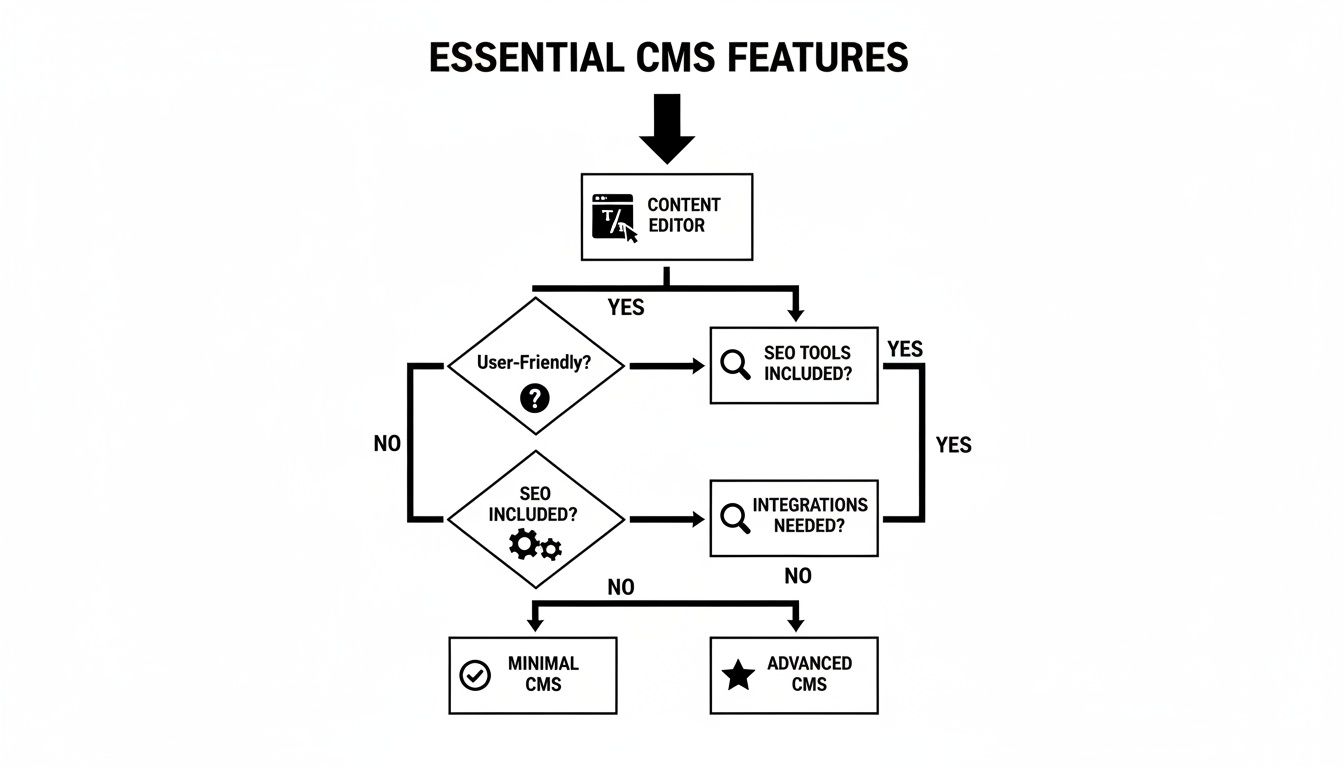
As you can see, this path takes you from the basics, like a user-friendly editor, all the way to more advanced needs like custom integrations. It's a simple way to figure out if you need a straightforward CMS or something with a bit more horsepower.
Ultimately, by mapping your goals to what a platform does best, you’ll choose a system that not only works for you today but is ready to grow with you tomorrow.
Common Questions About Content Management Systems
As you start wrapping your head around what a content management system is, a few practical questions are bound to surface. Getting clear, straightforward answers is the key to making a confident decision for your Australian business.
Let’s dive into some of the most common queries we hear from business owners just like you.
Can I Switch My CMS Later?
The short answer is yes, you can absolutely switch your CMS if your business needs change down the track. But, and this is a big but, it’s a major project. Think of it less like swapping an app on your phone and more like physically moving your entire office to a new building.
Migrating all your content, designs, and features from one system to another takes a lot of careful technical planning. The process can be pretty complex, and if it’s not handled just right, you risk losing valuable SEO rankings, breaking website links, or even losing data for good. That's why it's always best to choose a scalable CMS from the start—one that can grow right alongside your business.
What Is the Difference Between a CMS and a Website Builder?
This is a really common point of confusion, so let's clear it up. A website builder (think platforms like Wix or Squarespace) is a simple, all-in-one tool that’s built for ease of use above all else. It's designed for beginners to get a good-looking site up quickly, but that simplicity often comes at the cost of flexibility and real control.
On the other hand, a content management system (like WordPress) is a much more powerful and customisable platform. It gives you far greater control over your site's design, features, and scalability. Ultimately, it gives you full ownership of your digital asset. While there might be a slightly steeper learning curve, a CMS provides a much more robust foundation for a business with long-term growth plans.
A website builder is like renting a furnished apartment—it's quick and easy, but your customisation options are very limited. A CMS is like owning the house—you have the freedom to renovate, extend, and build it out exactly as you see fit.
How Much Does a CMS Cost for a Small Business?
There’s no single price tag here; the cost of a CMS for a small business can vary dramatically depending on your needs. Open-source platforms like WordPress are technically ‘free’ to download, but you’ll still need to budget for the essentials. These include:
- Web Hosting: This is the digital 'land' where your website lives online.
- Themes and Plugins: You can find both free and premium options to add specific designs and functionality.
- Development and Maintenance: These are the costs for getting it all set up, customised, and supported over time.
In contrast, SaaS platforms like Shopify have clear monthly subscription fees. These often scale up as your business grows or as you need more advanced features. When you're putting a budget together, it's vital to think about both the initial setup costs and the ongoing expenses needed to keep your site running smoothly and securely.
Ready to build a website that works as hard as you do? The team at Website Builder Australia delivers high-quality, custom websites with friendly local support. Get a free quote today and let's bring your vision to life.


