

Mobile App Development Process: A 2026 Guide
You've got an app idea scribbled in Notes, a few voice memos about features, and a feeling that it could open a new revenue stream or make life easier for customers. Then the hard part arrives. Who do you hire, what do you build first, how much planning is enough, and how do you stop the whole thing becoming an expensive side project that never really lands?
That's where most Australian SMB app projects either become commercial assets or budget sinkholes. The difference usually isn't the idea. It's whether the business treats the app like a product with a lifecycle, or like a one-off build.
A good mobile app development process isn't red tape. It's how you reduce rework, make sensible trade-offs, and avoid paying twice for the same decision.
Your App Idea Needs a Blueprint Not Just a Builder
A common starting point looks like this. A clinic wants an app for bookings and reminders. A wholesaler wants a trade ordering app. A service business wants customers to upload photos, request quotes, and track jobs. The owner speaks to a developer and starts with features. Login. Payments. Push notifications. Chat. Loyalty. Admin dashboard.
That sounds productive, but it often skips the question that matters most. What job is the app doing for the business and for the user?
In Australia, expectations are high because the market is strongly connected. The Australian Communications and Media Authority reported that 98% of Australian adults used the internet in 2023–24, and DataReportal noted 33.0 million mobile connections in January 2025, equal to 124% of the population in Australia's digital environment, which helps explain why teams need a more disciplined process rather than a loose build-and-launch approach (mobile app development context).
Why a loose brief costs more later
If you hire “a builder” before you've shaped the product, two things usually happen.
- Features expand too early. You add ideas before testing whether people will use the basics.
- Technical decisions get made in a vacuum. The team picks tools and architecture before the business has settled on the requirements.
- QA becomes reactive. Problems get discovered late, when they're slower and more expensive to fix.
Practical rule: If you can't explain your app in one plain-English sentence, you're not ready to scope it.
For SMBs, the better mindset is to treat the app as a product initiative. That's why broader product planning frameworks, like this guide to the new product development process, are useful before you get into app-specific decisions. They force the right early questions around demand, positioning, and delivery.
Start with a usable brief
Before anyone estimates cost or timeline, get your thinking into a short document. Not a giant spec. A working brief.
Include:
- Business goal such as reducing phone-based admin, improving repeat ordering, or creating a paid digital service
- Primary user and what they need done quickly
- Core task flows like book, pay, track, reorder, upload, approve
- Operational constraints such as existing software, staff capacity, approval workflows, and support needs
If you haven't written one before, a practical reference is this explanation of a design brief and why you need one. It helps turn an idea into something a designer, developer, or agency can respond to.
A blueprint doesn't slow the app down. It stops the wrong app being built quickly.
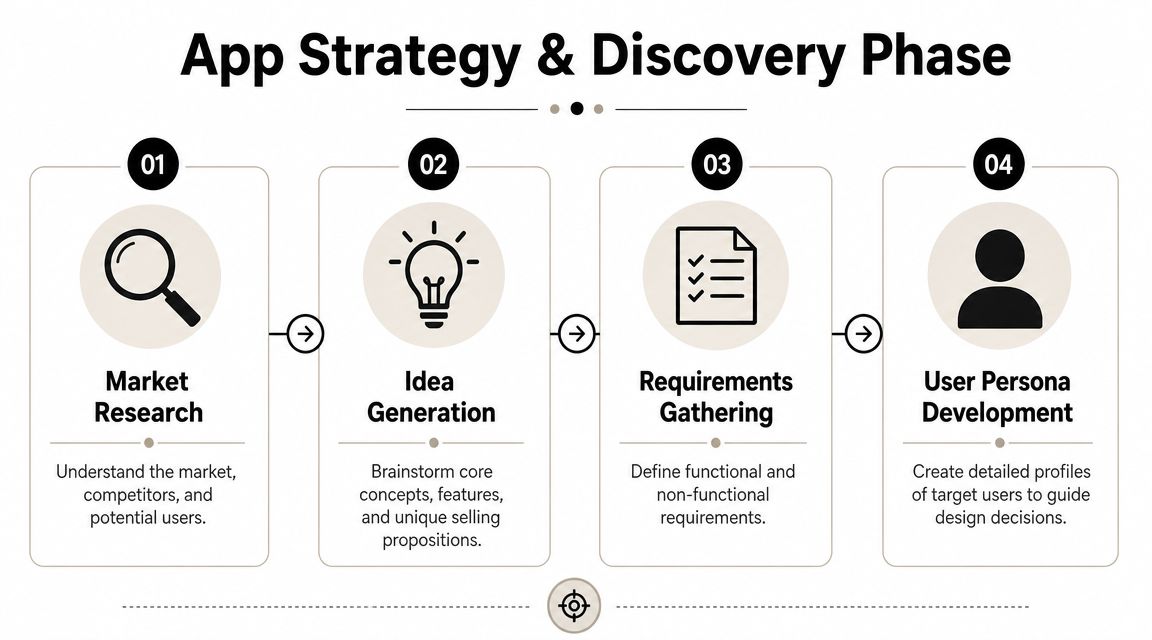
The Foundation Strategy and Discovery Phase
Strategy and discovery is where an app project becomes commercially sane. This is the phase that tells you whether the idea is viable, what version one should include, and what can wait. For small businesses, this is often the cheapest place to fix a bad assumption.
Start with the problem, not the feature list
The app should solve one clear problem first. If you run a plumbing business, the problem might be faster job approvals and fewer calls. If you run a retailer, it might be easier repeat purchasing. If you manage a fitness brand, it might be member retention through bookings and content.
Write down:
- What frustrates customers now
- What frustrates staff now
- What the app must improve first
- What would make the app unnecessary
That last point is important. Sometimes a mobile app isn't the first answer. A mobile-optimised website, client portal, or internal workflow tool may solve the issue with less cost and less maintenance.
Define the MVP properly
Australian smartphone use supports a mobile-first approach, and smartphone penetration is projected to reach 91.8% by 2028, which is one reason a well-defined Minimum Viable Product is such a sensible launch model for local businesses (MVP planning for app delivery).
An MVP is not a cheap version of the dream app. It's the smallest version that proves whether the app creates value.
A strong MVP usually has:
- One primary user type rather than trying to serve everyone
- A narrow feature set focused on the main job to be done
- A feedback path so you can learn what users want next
A weak MVP usually includes too many edge-case features, too much admin complexity, and branding polish that adds little commercial value early on.
Build the shortest path between user intent and user outcome. Everything else is a candidate for later.
Questions worth answering in discovery
Discovery isn't just market research. It's decision-making. Good teams leave this phase with fewer assumptions and clearer priorities.
Use these prompts:
Audience fit
Are you building for existing customers, staff, franchisees, members, or a new market?Competitive position
What do competing apps do well, and where are they clumsy, slow, or overloaded?Operational reality
Who updates content, resolves bugs, answers support requests, and owns post-launch decisions?Technical dependencies
Does the app need to connect with booking software, payments, stock systems, CRMs, or field service tools?Success criteria
How will you judge whether the app is working for the business?
For businesses exploring more advanced workflows, data automation, or AI-assisted customer experiences, bringing in outside thinking early can help. A specialist service like AI strategy consulting can be useful when your app concept overlaps with automation, decision support, or operational efficiency.
What a solid discovery output looks like
By the end of discovery, you want a short, usable pack that includes:
| Item | What it does |
|---|---|
| Product summary | Defines the problem, user, and business case |
| MVP scope | Separates must-haves from later ideas |
| User journeys | Shows the core flows screen by screen |
| Requirements list | Captures functional and non-functional needs |
| Delivery roadmap | Sets the order of work for design, build, testing, and launch |
This phase feels slower to impatient founders. It usually saves time where it counts.
Designing the Experience Your Users Will Love
Most SMBs don't lose users because the app lacks advanced technology. They lose users because the app is awkward. Forms are too long. Navigation is unclear. The first screen asks for too much. Buttons sit where thumbs don't naturally go. Error messages make no sense.
That's why the design stage matters. UX is how the app works and how easy it feels to complete a task. UI is how it looks, how it reflects your brand, and how clearly it guides the user.
Wireframes first, polish later
Good app design starts rough. That's deliberate.
Teams should begin with low-fidelity wireframes that map:
- the home screen
- the key journeys
- what happens after each tap
- what the user sees when something goes wrong
At this point, black-and-white sketches are often more useful than polished mock-ups. They keep the conversation on flow, not colour palettes.
A practical sequence looks like this:
Sketch the main user journey
Example: open app, log in, place order, confirm payment, track status.Remove steps
If a user needs seven taps to complete a simple action, that's usually too many.Test the logic
Ask someone unfamiliar with the project to walk through it.Only then design the interface
Branding matters, but not before the flow works.
UX decisions that affect business outcomes
A well-designed app doesn't just look cleaner. It reduces friction in ways the business can feel.
Consider the difference between these two approaches:
- A booking app asks new users to create an account before they can browse availability.
- Another lets them browse first, then sign up when they're ready to confirm.
The second flow often feels lighter because it respects intent. The same rule applies to ecommerce reordering, service requests, quote uploads, and account management.
If a feature needs a tutorial to be understood, the design probably needs another pass.
What to design for in Australian SMB apps
For local service businesses and growing brands, useful design priorities often include:
- Thumb-friendly navigation so users can operate the app one-handed
- Fast recognition of key actions like book, buy, pay, call, reorder, track
- Accessibility basics such as readable contrast, clear labels, and predictable interactions
- Error recovery so users can fix mistakes without abandoning the task
- Consistent brand cues without letting branding overwhelm usability
Prototype before you build
An interactive prototype is where many expensive misunderstandings get caught. This is the clickable version of the app that behaves enough like the final product to test journeys and get stakeholder feedback.
Use prototypes to answer practical questions:
- Do users understand the home screen?
- Can staff complete the admin tasks they need?
- Does the sign-up process feel too heavy?
- Are people missing important actions?
This stage is also where internal disagreements become visible. Owners often discover that what marketing wants, what operations wants, and what customers need aren't always aligned. Better to sort that out in Figma than after development starts.
The strongest app designs feel obvious when you use them. That effect usually comes from careful iteration, not inspiration.
The Build Choosing Your Development Path
The build phase is where strategy turns into software, but one decision shapes almost everything after it. Do you build natively for iPhone and Android separately, or use a cross-platform approach with one shared codebase?
For SMBs, this isn't a technical purity contest. It's a business decision about cost, speed, performance, and future maintenance.
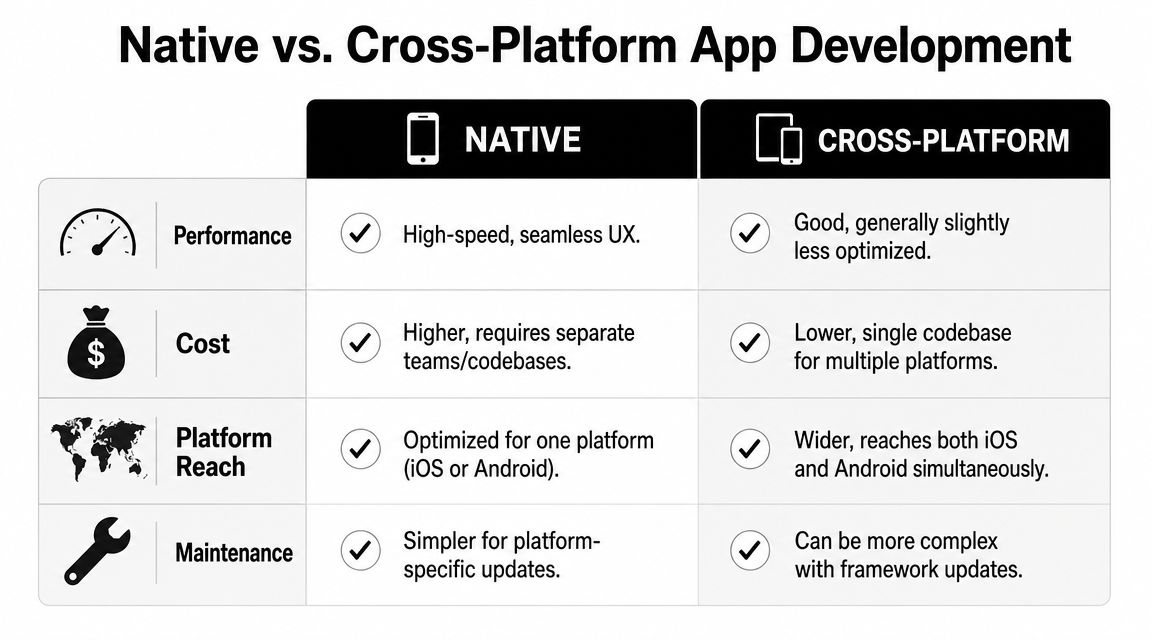
Native and cross-platform compared
| Option | Best suited to | Main strength | Main trade-off |
|---|---|---|---|
| Native | Apps needing deeper device integration or highly polished platform-specific behaviour | Strong performance and tighter access to device features | More development effort across platforms |
| Cross-platform | SMBs wanting faster rollout across iOS and Android | Shared codebase and more efficient delivery | Some edge cases can become more complex over time |
Native usually means Swift for iOS and Kotlin for Android. Cross-platform often means tools such as React Native or Flutter.
If your app depends heavily on camera behaviour, offline workflows, Bluetooth devices, or highly tuned animations, native may be worth the extra investment. If your app is more about customer accounts, bookings, loyalty, ordering, or standard business workflows, cross-platform can be a practical fit.
A useful technical primer for one common option is this overview of React Native mobile app development.
What SMBs should weigh before choosing
The wrong question is, “What's the best technology?”
The right questions are:
- What does version one need to do well?
- How fast do we need to launch?
- Who will maintain this after launch?
- Will the app become more complex over time?
Here's where projects often go wrong.
Over-specifying too early
Businesses choose a heavyweight build path before proving demand.Choosing on price alone
A lower upfront build can become harder to maintain if the architecture is weak.Ignoring internal capability
If no one owns the product after launch, even a well-built app drifts.
This explainer is useful if you want a broader visual on platform trade-offs before discussing options with a developer.
Architecture decisions matter too
The mobile app itself is only part of the build. You also need to think about:
- where content and data live
- how the app talks to third-party systems
- how updates are deployed
- how admin functions are handled
A basic customer-facing app with no integrations is a very different build from one that needs payments, inventory syncing, booking engines, CRMs, or staff permissions.
Choose the build path that suits the app you're launching now, with enough room for the app you might be running later.
Clean architecture beats flashy complexity. Especially for SMBs.
Launch Pad Quality Assurance and Store Deployment
Plenty of businesses think testing starts once development is “finished”. In reality, good teams test all the way through. That matters because app issues rarely show up in a neat, predictable way. They appear on specific phones, under weak signal, after an OS update, or when a user does something you didn't expect.
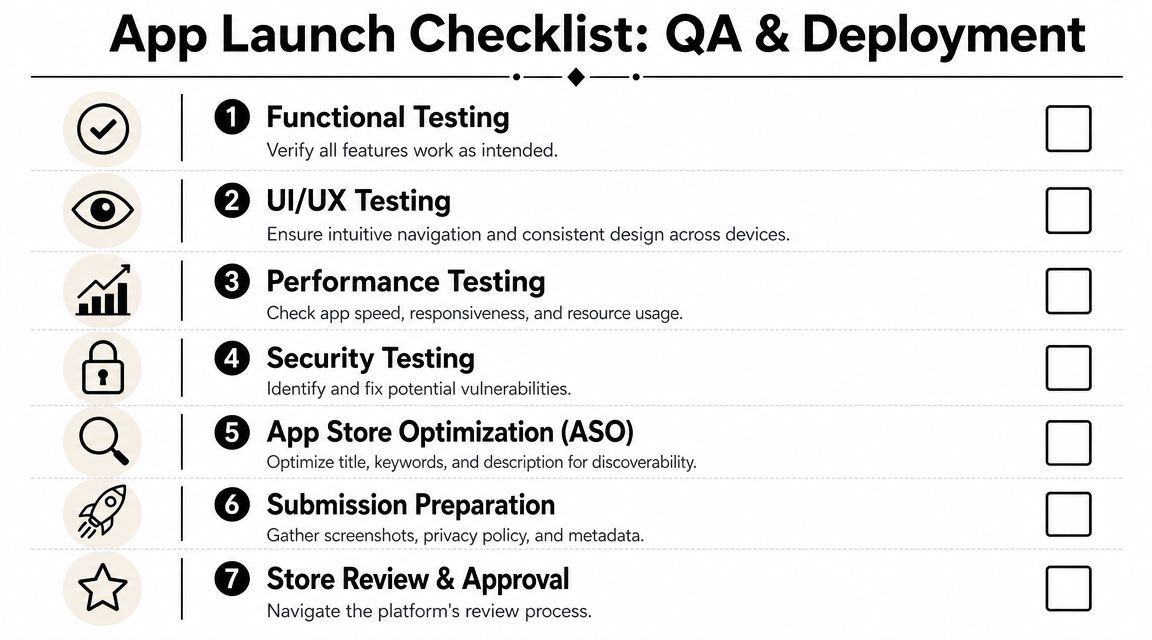
QA is not one final box to tick
A sensible mobile app development process uses short loops where planning, build, and testing happen repeatedly. That's especially important because QA has to account for “tens of thousands” of device and OS combinations, and one best practice is testing on multiple physical devices rather than relying only on emulators (QA guidance for mobile app testing).
For SMBs, that translates into a simple rule. Don't leave QA to the end and don't assume one successful test run means the app is ready.
What should actually be tested
A useful pre-launch QA pass should include:
Functional testing
Every key action should work as intended. Sign-up, login, checkout, booking, notifications, uploads, and account changes.Usability testing
Real people should be able to complete tasks without guidance.Regression testing
New fixes shouldn't break old features.Device-specific testing
The app should be checked on multiple physical devices, not just in simulated environments.User acceptance testing
Business stakeholders should confirm that the app fits real operational use.
A clear explanation of software QA principles can help non-technical owners ask better questions during this phase. One accessible reference is TekRecruiter's insights on software quality.
Store deployment needs preparation
App Store and Google Play submission often feels bureaucratic because it is. Stores want consistency, accurate metadata, and compliance with their policies.
Before submission, prepare:
- App name and description that match what the app does
- Screenshots and preview assets that reflect the current build
- Privacy policy aligned with data collection and user permissions
- Support contact details and business information
- Testing credentials if reviewers need access to protected areas
Common launch mistakes
| Mistake | What it causes |
|---|---|
| Treating QA as a final phase only | Late defects and launch delays |
| Testing mostly on emulators | Device-specific issues after release |
| Rushing store assets | Rejections or messy first impressions |
| Launching without rollback thinking | Slower recovery if something breaks |
A smooth launch usually looks uneventful from the outside. That's the result of preparation, not luck.
Approval can still take time, and stores can ask for changes. Plan for that. Don't schedule your marketing campaign as if app review timing is fully in your control.
Beyond Launch The Real Work of App Ownership
A lot of app advice stops at deployment, which is exactly where owners start learning how demanding the asset really is. The app is live, users are downloading it, and now every small issue becomes operational. Reviews arrive. Devices update. A payment flow fails on one handset. Content needs changing. Someone asks for analytics. Someone else wants a new feature because a competitor has it.
That's normal. It's also why launch is not the finish line.

A major weakness in many app guides is that they barely deal with what happens after release. Yet post-launch operational cost matters, especially for Australian SMBs that need to budget for the first year of maintenance, analytics, and security patching to keep the app stable and trustworthy (post-launch app lifecycle planning).
What ownership looks like in practice
Once the app is live, someone needs to own a set of ongoing jobs:
- Monitoring performance so crashes, slow screens, and failed actions are spotted quickly
- Reviewing user feedback from app stores, support channels, and in-app behaviour
- Maintaining compatibility as iOS and Android change
- Applying security updates to libraries, integrations, and backend services
- Managing content and product changes so the app stays commercially relevant
Many SMBs often face a common pitfall. They assumed the budget covered “the app”. However, they had only purchased the first release of the app.
Why post-launch budgets matter
The cost after launch isn't only about bug fixing. It includes the operating reality of keeping a digital product healthy.
Your first-year plan should account for:
- maintenance and small fixes
- analytics and reporting tools
- app store compliance updates
- hosting or backend services where relevant
- feature refinement based on real usage
- internal product ownership time
If you're trying to map the commercial side properly, this breakdown of mobile app development cost considerations is a useful starting point for framing build versus maintenance discussions.
The app that survives is rarely the one that launched with the most features. It's the one that kept improving after real users arrived.
The team behind a healthy app
Even a modest app needs clear responsibilities. One person can cover more than one role in a small business or agency setup, but the responsibilities still exist.
| Role | Responsibility |
|---|---|
| Project manager or product owner | Prioritises work, manages scope, keeps decisions moving |
| UX designer | Refines journeys, solves friction, improves usability |
| UI designer | Maintains visual consistency and interface clarity |
| Mobile developer | Builds and updates the iOS, Android, or cross-platform app |
| Backend developer | Manages integrations, databases, APIs, and server-side logic |
| QA specialist | Tests features, devices, flows, and release readiness |
| DevOps or deployment support | Handles environments, releases, and technical stability |
| Marketing or growth lead | Drives adoption, messaging, and launch promotion |
| Support or operations lead | Handles user issues, feedback, and internal escalation |
What good post-launch strategy looks like
Strong app ownership is usually boring in the best way. There's a rhythm to it.
Review usage, then prioritise
Don't let the roadmap get driven by whoever shouts loudest. Review feedback, support issues, usage trends, and commercial priorities together. Then decide what matters.
Protect the core journey
If your app's main value is booking, ordering, or tracking, keep improving that path before adding novelty features.
Treat trust as part of the product
Reliability, privacy, updates, and responsiveness affect whether users keep the app installed. Trust isn't separate from UX. It's part of it.
Keep scope under control
Every new feature adds design work, testing effort, support load, and future maintenance. “Can we add this?” should always be followed by “What does it cost us to carry?”
For most SMBs, the best mobile app development process is not the most elaborate one. It's the one that keeps decisions clear from idea to operations. Discovery tightens scope. Design removes friction. Build choices reflect business reality. QA catches problems before customers do. Post-launch ownership keeps the asset useful.
That's how an app becomes part of the business instead of an expensive experiment.
If you're planning an app and want local guidance that covers strategy, design, development, and the practical realities after launch, Website Builder Australia can help you scope the right product, avoid common cost traps, and build something your business can maintain and grow.


