

What Is On Page SEO Optimization Explained
On-page SEO is everything you do on your actual website to make it more attractive to search engines and, most importantly, to your visitors. It’s all the stuff you have direct control over, from the words on the page and your headlines to the more technical bits like how fast your site loads.
What On-Page SEO Really Means
Let’s ditch the technical jargon for a moment. Think of your website as a physical shop in a busy Melbourne shopping centre. On-page SEO is how you set up your shop to make it the absolute best place for customers to find what they need.
You wouldn't just scatter products around randomly, would you? Of course not. You’d have clear signs for each aisle (your headings), well-organised product displays (your content), and a layout that’s easy to navigate (your user experience). On-page SEO does the same thing for your website, using specific signals to show Google's crawlers that your page is the perfect answer to a searcher's question.
Why It's So Important For Your Business
Getting a handle on on-page SEO gives you a massive advantage because you are in the driver's seat. Unlike off-page SEO (which relies on things like backlinks from other sites), these are changes you or your developer can make right now. For Aussie small businesses trying to carve out a space online, that level of control is pure gold.
Even with things like AI Overviews shaking up search results in 2026, the fundamentals haven't changed. In fact, they're more important than ever. It's surprising, but research shows that roughly 7.4% of high-ranking pages are completely missing title tags, and a whopping 25% don't have a meta description. This just goes to show that plenty of your competitors are dropping the ball on the basics, creating a golden opportunity for you to pull ahead.
At its core, on-page SEO is about making your website's value clear and accessible. It’s the art of aligning your content with what users are searching for, and presenting it in a way that search engines can easily understand and reward.
When you get it right, you create a better, faster, and more helpful experience for your visitors. People who find your site useful and easy to use stick around longer, engage with your content, and are far more likely to become customers. These positive signals tell Google your site is a quality resource that deserves a top spot.
To get you started, here is a quick overview of the key factors we'll be diving into.
Core Elements of On-Page SEO at a Glance
| On-Page Element | Primary Purpose | Impact on SEO |
|---|---|---|
| Title Tags & Metas | Create a compelling "ad" in search results to earn clicks. | High |
| Heading Tags (H1-H6) | Structure content for readability and topical relevance. | High |
| Quality Content | Answer user search intent and establish expertise. | Very High |
| Clean URLs | Provide a clear, human-readable path for users and crawlers. | Medium |
| Image Optimisation | Improve page speed and provide context through alt text. | Medium |
| Internal Linking | Distribute authority and guide users through your site. | High |
| Schema Markup | Help search engines understand content for rich results. | Medium |
| User Experience (UX) | Keep users engaged and on-site longer. | High |
| Page Speed | Ensure a fast, frustration-free experience for visitors. | Very High |
| Mobile-Friendliness | Deliver a seamless experience on all devices. | Very High |
This table gives you a roadmap for what's to come. In this guide, we'll break down each of these elements one by one, giving you a clear, actionable plan to optimise your website and start climbing those rankings.
Mastering Your Title Tags, Meta Descriptions, and Headings
Think of your title tag and meta description as the digital shopfront for every single page on your website. When someone searches on Google, these are the first things they see. It's your one shot to make a great first impression and convince them to click your link instead of scrolling right past to a competitor.
These two little snippets of text, along with your page headings, are the absolute bedrock of good on-page SEO. They act like signposts, telling both search engines and your potential customers exactly what your page is about before they even land on it.
Crafting Title Tags That Earn Clicks
Your title tag is that clickable blue headline you see in Google's search results. It’s arguably the single most important on-page SEO factor because it directly affects your rankings and, just as importantly, your click-through rate (CTR). A well-written title is a mini-advertisement for your page.
Let's say a Brisbane plumber has a page with a title like "Plumber in Brisbane". It’s functional, but it’s not going to grab anyone’s attention. An optimised title, on the other hand, is a different story:
- Before:
Plumber in Brisbane - After:
24/7 Emergency Plumber Brisbane | Fast Blocked Drain & Hot Water Repairs
See the difference? The "After" version still has the main keyword ("Plumber Brisbane"), but it also throws in compelling reasons to click, like "24/7 Emergency" and "Fast". It even calls out specific, high-intent services like "Blocked Drain" and "Hot Water Repairs". This speaks directly to someone in a jam, making them far more likely to click.
Don't underestimate the power of this simple tweak. A study across Australian websites revealed that optimising title tags can boost organic clicks by an average of 107%, with some pages seeing jumps as high as 437%! You can check out the full study on SEO statistics from Safari Digital.
Writing Meta Descriptions That Convert
The meta description is that short blurb of text under your title tag in the search results. While Google says it's not a direct ranking factor, it is absolutely your sales pitch. Its entire job is to persuade the searcher that your page holds the best answer to their problem.
A bland, generic description is a wasted opportunity. Let’s give one a quick makeover:
- Before:
We offer plumbing services in the Brisbane area. Contact us for more information about our services. - After:
Need a reliable Brisbane plumber? We offer 24/7 emergency service for blocked drains, hot water systems & more. Get a fast, upfront quote online. Call now!
The optimised version is packed with action-oriented words, lists key services again, and finishes with a strong call to action. It builds trust and creates a sense of urgency, turning a passive browser into an active visitor. Getting good at this is a skill that applies elsewhere, too, like when optimizing press releases with SEO keywords and metadata.
Structuring Content With Headings
Finally, we have your headings (H1, H2, H3, and so on). These are the headlines and subheadings you use within the actual content on your page. They are absolutely vital for organising your information in a way that’s easy for people to scan and for Google to understand.
Think of headings as the chapter titles and subheadings of a book. They create a clear structure that guides readers and search engines through the story your content is telling, making complex information easy to digest.
Your page should only ever have one H1 tag—this is the main title of the page itself. From there, use H2s to break up the content into major sections, and then H3s to break those sections down into smaller, specific points. This structure isn't just for looks; it makes your content more readable for users and helps Google figure out the key themes and topics you're covering.
Creating Content That Google and Customers Love
While all the technical bits and pieces are important, the real heart and soul of on-page SEO in 2026 is your content. Think of it this way: your page titles get people to the door, but it’s your content that convinces them to come inside, look around, and maybe even stay for a cuppa.
If what you've written doesn't genuinely help someone or answer their question, all the technical wizardry in the world won't make a lick of difference.
Google's main job is to give its users the best possible answer for what they're searching for. To do this, it looks for signs of Expertise, Experience, Authoritativeness, and Trustworthiness (E-E-A-T). This means your content has to be more than just a place to stuff keywords—it needs to be truly helpful, insightful, and well-put-together.
Crafting Content That Shows Off Your E-E-A-T
Building content that clicks with both your customers and Google starts with really understanding what your audience is after. You're not writing for a robot; you're writing for a real person who has a problem they need sorted, right now.
Here’s how to create content that builds that all-important trust and authority.
- Solve Problems, Don't Just List Features: Instead of just saying what your service does, show how it fixes a specific headache. A page on "waterproofing services" is okay, but "How to Permanently Fix a Leaking Basement Wall" is a whole lot more compelling.
- Show, Don't Just Tell: There's nothing like proof. Use real-world examples, case studies, and glowing testimonials. If you're a builder in Perth, pop in some photos and a short story about a recent renovation you finished in Subiaco. It’s tangible proof you know your stuff.
- Write for Humans First: Keep it natural and conversational. Yes, you need to include your keywords, but you should also use synonyms and related phrases. This shows you have a deep understanding of the topic and avoids sounding like a clunky, repetitive robot.
When you focus on providing genuine value, you naturally start ticking all the E-E-A-T boxes. Your website stops being a simple online brochure and starts becoming the go-to resource in your field.
Weaving Keywords in Naturally
Once you've got a fantastic, user-focused idea for your content, it’s time to bring in your keywords. This is a massive part of what on-page SEO optimisation is, but it requires a delicate touch. Keyword stuffing—the old-school tactic of cramming a page full of keywords—is a surefire way to get penalised by Google.
Instead, you need to be strategic.
- Your main keyword should pop up in your H1 heading and somewhere in the first 100 words of your content.
- Use your primary keyword and its important variations in your H2 subheadings.
- Sprinkle related terms and synonyms (sometimes called LSI keywords) throughout the body of your text to show Google you're covering the topic in depth.
The real goal is to create a piece of content that would still be the absolute best resource on the topic, even if search engines didn't exist. When you can do that, the SEO results almost always take care of themselves.
The Overlooked Power of a Clean URL
Finally, let's talk about something that’s often forgotten: your page’s URL. It's one of the first things a user—and a search engine—sees to figure out what your page is about. A clean, descriptive URL reinforces your content's topic and just feels better for the user.
A good URL is simple, easy to read, and contains your main keyword. Let's look at the difference between a messy, system-generated URL and a clean, optimised one.
URL Structure Optimisation Before vs After
| Element | Poor URL Example | Optimised URL Example |
|---|---|---|
| Readability | .../category.php?id=123&product_page=4 | .../services/emergency-plumbing-sydney |
| Keyword | Not present or unclear | Clearly includes "emergency plumbing sydney" |
| User Trust | Looks technical and untrustworthy | Clear, simple, and instills confidence |
Getting your URL structure right is a simple but powerful part of what is on page seo optimization. For businesses using a platform like the one we offer at Website Builder Australia, customising your URLs is a dead-simple process that adds a professional touch and a clear SEO advantage to every single page you build.
Optimising Your Images and Internal Links

Once you’ve nailed your content and URLs, it's time to zoom in on the finer details. These are the little things that take a website from just 'good' to truly optimised for search engines and users alike.
Two of the most overlooked—and most powerful—elements are your images and your internal links. Get these right, and you'll see a real impact on your site's speed, user experience, and how easily Google can figure out what you're all about.
Think about it. Huge, clunky images are a quiet performance killer. They make your pages load at a snail's pace, and in an age of instant gratification, that's enough to send visitors packing. Since Google has confirmed page speed is a ranking factor, this is something you just can't afford to get wrong.
And a website with no internal links? It’s like a library with no catalogue or signs on the shelves. Just a random collection of books with no clear connection. Strategic internal links are the bridges that guide both your visitors and search engine crawlers, showing them exactly how all your content fits together.
Mastering Image Optimisation
Every single image you upload is a chance to improve your on-page SEO. It’s not just about making the page look good; it’s a crucial part of improving speed, making your site accessible, and giving Google more clues about your content.
Here’s how you can make your images pull their weight:
- Compress Your Images: Before anything else, get those file sizes down. A photo straight off a digital camera can be massive, adding precious seconds to your load time. Using a tool like TinyPNG can shrink file sizes by over 70% with almost no visible difference in quality.
- Use Descriptive File Names: Don't just upload
IMG_8457.jpg. That tells Google absolutely nothing. Be descriptive! If you're an electrician in Sydney, a file namedemergency-electrician-sydney-van.jpgis infinitely more helpful. - Write Effective Alt Text: Alt text is a short, simple description of an image. It's what shows up if the image breaks, but more importantly, it's what screen readers use to describe the image to visually impaired users. It also gives search engines extra context, so make it concise and accurate.
Properly optimised images mean a faster site, which is vital for keeping visitors happy. For businesses with customers across Australia, using a Content Delivery Network (CDN) can be a game-changer for delivering those images even faster.
Building a Strong Internal Linking Structure
Internal linking is simply the act of linking from one page on your website to another. It sounds simple, but when you do it right, it's one of the most effective on-page SEO strategies you have. It accomplishes three critical things at once.
First, it helps search engines find all your pages and understand how they relate to each other. When you link from a popular, high-authority page to a newer one, you're passing some of that authority—often called "link equity"—across, helping the new page get recognised and ranked faster.
Think of internal links as votes of confidence for your own pages. You're telling Google, "Hey, this page over here is really important," and "These two topics are closely related." This builds a clear site structure and establishes your topical authority.
Second, it massively improves the experience for your visitors. By linking to other relevant articles and resources, you create a natural pathway for them to explore your site. This keeps them engaged, increases their time on your site, and helps them find exactly what they're looking for—all brilliant signals to send to Google.
Finally, smart internal linking helps you spread authority around your site. Got a blog post that went viral and gets heaps of traffic? Perfect. Add a few internal links from that powerhouse page to your key service or product pages. You'll channel that traffic and authority right where your business needs it most. That’s the core of what on-page SEO optimisation is all about: making the most of the assets you already have.
Gaining an Edge with User Experience and Schema
Alright, you’ve nailed the basics of on-page SEO. Your content is solid, your keywords are in place, and you’re on Google’s radar. Now, it's time to pull ahead of the pack.
We’re moving into the territory that many of your competitors completely ignore: User Experience (UX) and Schema Markup. Think of these as the secret ingredients that turn a good website into a great one—the kind that visitors love and Google can’t help but recommend.
Making User Experience Your Secret Weapon
User experience is exactly what it sounds like: how a person actually feels when they’re on your website. Is it a breeze to use, or a total headache? Can they find what they need in a flash, or is it a slow, clunky, and frustrating mess?
Google is obsessed with this. Its whole business relies on sending people to useful, enjoyable pages. If Google points someone to a site that delivers a terrible experience, that person loses a little bit of trust in Google's recommendations. That's why they created the Core Web Vitals.
Don't let the technical name scare you. They’re just Google’s way of measuring three simple things that drive users nuts:
- Loading: How fast does the good stuff on your page actually appear for the visitor? This is called Largest Contentful Paint (LCP).
- Interactivity: When someone clicks a button or opens a menu, does it respond instantly? Or is there an annoying delay? That’s Interaction to Next Paint (INP).
- Visual Stability: Ever tried to click something, only to have an ad load and push the button down the page? That infuriating page jump is what Cumulative Layout Shift (CLS) measures.
These aren’t just numbers on a report; they’re a direct reflection of real-world user frustration. A slow site or a jumpy layout sends a clear signal to Google that your page is low-quality. On the flip side, a fantastic user experience tells Google that your site is a top-tier result. If you really want to get this right, digging into the core user experience design principles will give you a massive advantage.
Speaking Google's Language with Schema Markup
Once you’ve made sure your site is a pleasure to use, it's time to make it dead simple for search engines to understand. This is where Schema Markup shines.
Think of Schema as a secret language you have with Google. You add these little "translation tags" to your website’s code to give search engines extra context about what your content is. You’re not just telling Google "this is a heading"—you’re telling it, "This heading is the name of a recipe," or "This number is the price for this specific product."
Schema Markup is invisible to your human visitors. It's a special vocabulary just for search engines, helping them connect the dots and understand the meaning behind your content.
So, why go to all this trouble? The payoff is huge: you can earn rich snippets. These are the eye-catching, enhanced search results you see all the time, featuring things like:
- Five gold stars showing a product or service rating.
- FAQ dropdowns that answer questions right there in the search results.
- Event details with dates, times, and locations.
- Recipe snippets showing cooking time and calorie counts.
These snippets make your website stand out from the sea of plain blue links. A result with star ratings and pricing info is almost impossible to scroll past, which means more clicks for you.
Let’s imagine an electrician in Adelaide. By using LocalBusiness schema, they can spell out their address, phone number, opening hours, and service area for Google. When a local resident searches for an electrician, Google can show all that info right in the search results. That's a massive leg-up on competitors who haven't bothered, and it's a perfect example of how on-page SEO helps you win in local search.
Your Essential On-Page SEO Checklist
Alright, we've covered a lot of ground, from what makes a killer title to the nitty-gritty technical details. Now it's time to put it all into practice.
Think of this as your master checklist. You can use it to give your own website a thorough audit, or to have a clear, productive chat with your web developer. We’ve ordered the tasks from the absolute must-dos to the more advanced checks, giving you a straightforward path to better rankings and more of the right kind of traffic for your Aussie business.
Foundational Optimisation (The Must-Dos)
This is the bedrock. Seriously. If you get these fundamentals right, you’re already well on your way.
- Primary Keyword: Have you picked just one primary keyword for the page?
- Title Tag: Is your primary keyword in the title tag, ideally near the start? Keep it under 60 characters so it doesn't get chopped off in search results.
- Meta Description: Does your meta description give a compelling snapshot of the page and include a call to action? Aim for under 160 characters.
- Single H1 Tag: Double-check there’s only one H1 heading on the page and that it features your primary keyword.
Content and Structure
With the foundations sorted, we move on to the actual meat of the page. The goal here is to make your content a breeze for both people and search engines to read.
- Subheadings (H2, H3): Is the content broken up with keyword-rich H2 and H3 subheadings? This makes it much easier to scan.
- Keyword Placement: Does the primary keyword pop up naturally somewhere in the first 100-150 words?
- Image Alt Text: Do all your important images have descriptive alt text? This tells Google (and screen readers) what the image is about.
- Clean URL: Is the page URL short, descriptive, and does it contain your main keyword?
- Internal Links: Have you added at least 2-3 internal links to other relevant pages on your site? This is one of the most powerful yet underused small business SEO tips.
Technical and User Experience Checks
This final stage is all about the technical bits that your visitors actually see and feel. Getting this right has a huge impact on your rankings and how much people enjoy using your site.
The flow chart below shows how site speed, user experience, and schema markup all work together.
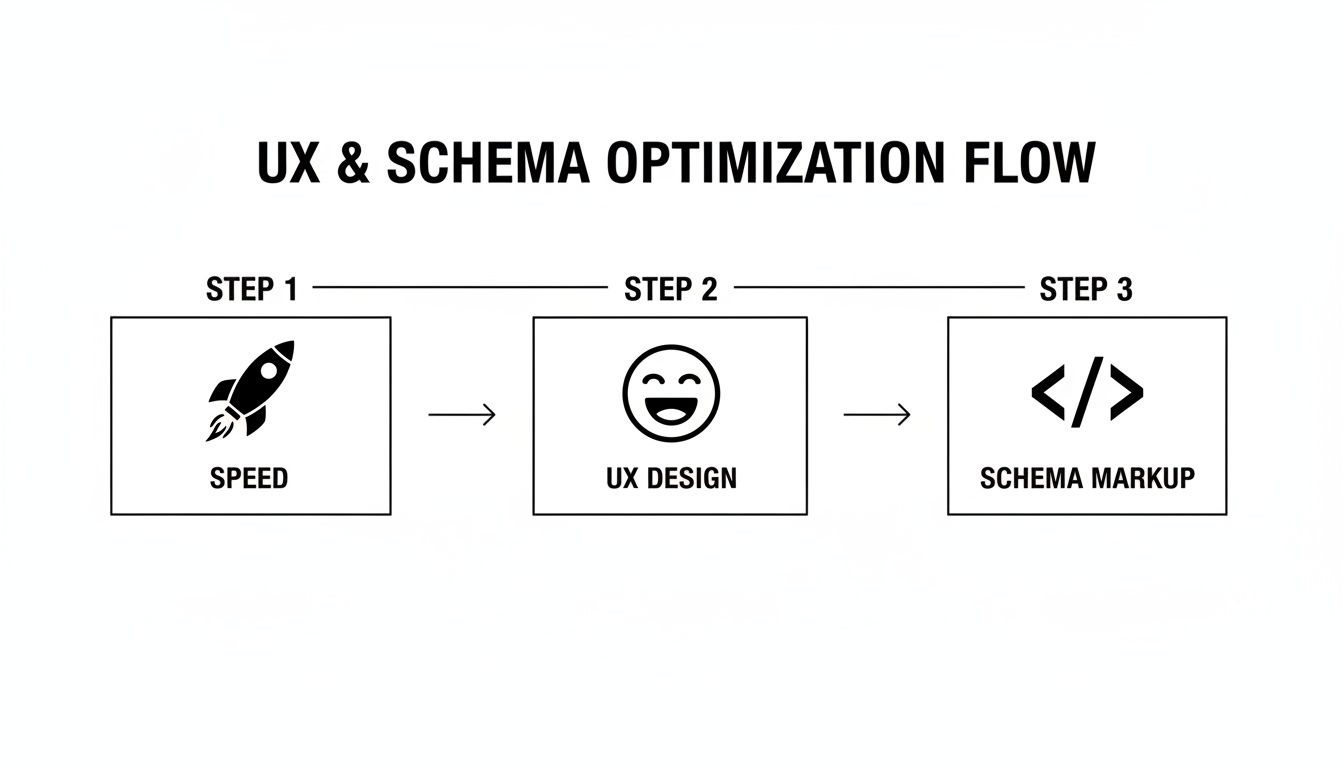
A fast site is the starting point for a good experience. Schema then helps by giving search engines extra context about what's on the page.
Expert Tip: Don't think of these as separate jobs. A fast, mobile-friendly page is a good user experience. Try looking at your website through the eyes of a first-time visitor on their phone. Is it quick? Is it easy to use? Does it help them?
- Mobile-Friendliness: Have you actually tested the page on your phone? Make sure it's easy to read and navigate without any awkward pinching or zooming.
- Page Speed: Run your page through a tool like Google PageSpeed Insights. Are there any major red flags that are slowing you down?
- Readability: Is the content easy to digest? Use short paragraphs, bullet points, and plenty of white space to give your reader's eyes a break.
Frequently Asked Questions About On-Page SEO
Even after getting your head around the basics, many Aussie business owners still have a few questions about what on-page SEO optimisation actually looks like day-to-day. Let's run through some of the most common ones to clear things up and get you on the right track.
How Long Does It Take to See Results From On-Page SEO?
Patience is definitely a virtue in the world of SEO, but the good news is that on-page efforts often show results much faster than other strategies. Simple tweaks, like sharpening up a title tag, can cause a noticeable bump in your rankings or click-through rates in just a few weeks.
For bigger jobs, like a major content overhaul or sorting out technical gremlins, it might take 2-4 months for Google to fully recognise and reward your efforts. The trick is to see on-page SEO as a consistent, ongoing habit for steady growth, not just a one-and-done fix.
What Is the Difference Between On-Page and Off-Page SEO?
Think of it like this: on-page SEO is everything you do on your own turf (your website) to make it a better place for visitors and search engines. This covers everything from improving your content and writing punchy titles to fixing up the technical backend. You're in complete control of all of it.
Off-page SEO, on the other hand, involves all the actions you take elsewhere online to build up your site's authority and reputation. This is mostly about earning backlinks from other trustworthy websites. You need both to truly succeed, but your on-page SEO is always the place to start.
Can I Do On-Page SEO Myself for My Small Business?
Yes, absolutely! Heaps of the foundational on-page tasks are well within reach for any business owner. Writing clear titles, making your content genuinely helpful, and using headings to structure your pages are all things you can tackle yourself.
For instance, when you're adding an FAQ section like this one to your own site, knowing how to structure FAQ content with schema markup can give your visibility a massive boost and help you show up in more "answer-style" search results.
But when it comes to the more technical side—things like fixing Core Web Vitals, implementing tricky schema, or doing a deep dive into site speed—partnering with a pro can save you a ton of time and make sure it's done right for the best possible impact.
At Website Builder Australia, we handle both the foundational and the technical sides of on-page SEO, so you can get back to what you do best: running your business. Learn how our expert team can optimise your site for success.


