

What Is Squarespace and Is It Right for Your Business in 2026
So, what exactly is Squarespace all about?
Put simply, Squarespace is an all-in-one website builder, crafted for people who want a stunning, professional website but have zero interest in learning to code. Think of it as a premium, ready-to-use toolkit for your online presence. Everything you need—hosting, design tools, security, and support—is bundled neatly into one subscription.
The Business-in-a-Box Website Builder
Imagine you're setting up a new high-end retail shop. Instead of having to find and manage an architect, a builder, and an interior designer separately, you’re handed a premium, all-inclusive package that just handles everything for you. That’s the exact philosophy behind Squarespace.
It's what we call a Software-as-a-Service (SaaS) platform. In plain English, that means you pay a single, regular fee for a whole suite of services. This completely does away with the headache of juggling separate accounts for web hosting, security certificates, and design software. It’s all under one roof, managed from one dashboard. Simple.
A Closed Yet Simple Ecosystem
Squarespace runs on what’s known as a "closed ecosystem." This is a big point of difference. Unlike open-source platforms like WordPress, you can't just install any old third-party template or plugin you find on the web. Now, that might sound limiting at first, but it’s actually one of its biggest advantages.
By controlling the entire environment, Squarespace ensures that every template, feature, and integration works seamlessly together. This focus on curation delivers remarkable simplicity, security, and reliability for its users.
This tightly controlled environment is what allows the platform to function as a complete content management system. It's why so many business owners choose it—they value rock-solid reliability and ease of use over endless, and often complicated, customisation options.
To give you a clearer picture, here's a quick summary of what Squarespace offers for Aussie businesses.
Squarespace at a Glance for Australian Businesses
| Feature | Description | Best For |
|---|---|---|
| All-in-One Platform | Includes hosting, domains, templates, and support in one package. | Business owners who want a single, simple solution. |
| Design-Focused | Award-winning templates with a strong emphasis on visual appeal. | Creatives, portfolios, and brand-conscious businesses. |
| Closed Ecosystem | Curated extensions and integrations for reliability and security. | Users who prioritise ease-of-use over endless customisation. |
| Integrated Ecommerce | Built-in tools for selling products, services, and subscriptions. | Small to medium-sized online stores and service providers. |
This table neatly sums up the platform's core strengths: it’s a beautiful, reliable, and consolidated tool designed for those who need a professional online presence without the technical fuss.
Who Is Squarespace Built For?
At its heart, the platform is designed for everyday users, not developers. It’s for people who prioritise clean aesthetics and straightforward functionality. It provides all the tools you need to build anything from a full professional website to a dedicated landing page for a marketing campaign.
It’s a fantastic choice for:
- Creative Professionals: Photographers, designers, and artists flock to Squarespace to build stunning online portfolios that let their work shine.
- Service-Based Businesses: Consultants, coaches, and local tradies use it to build clean, professional sites that attract new clients and build trust.
- Small Online Stores: Entrepreneurs and boutique brands can get a simple ecommerce site up and running in no time, with beautiful design and integrated payments.
Squarespace has really found its footing here in Australia, with a huge number of startups and service-based businesses getting on board. The growth has been massive in ecommerce, where Australian stores on the platform grew by roughly 29% in Q1 2023 alone. That growth is part of what makes up the more than 285,000 ecommerce sites running on Squarespace globally, highlighting its role as a powerful, visually-driven tool for Australian businesses.
Exploring the Core Features of Squarespace

To really get what Squarespace is all about, we need to pop the bonnet and see what’s powering it. The platform is so much more than just a pretty face; it’s a whole suite of integrated tools designed to help Aussie businesses build and grow online.
Let's break down what makes the Squarespace experience tick, starting with its famous, award-winning templates. These aren’t just cookie-cutter layouts. Think of them as professionally designed, strategic launchpads for your site. Each one is built with a specific purpose in mind, whether it’s for a Brisbane café, a Melbourne artist, or a Sydney consultant.
This design-first approach comes from a long history of refinement. Squarespace has been around since 2003, evolving from a university dorm room project into a major player. This long journey, including its $7.2 billion privatisation in 2024, has given it the resources to build genuinely robust features and offer solid support for markets like Australia. If you're interested in its growth, you can dive into these key Squarespace statistics.
The Fluid Engine Editor
The main tool you’ll use for customising your site is Fluid Engine, Squarespace’s modern drag-and-drop editor. The best way to picture it is as a super-flexible grid for your webpage. Instead of being stuck in rigid columns, you can move, layer, and resize different content blocks with incredible precision.
This gives you a huge amount of creative freedom, but without needing to touch a line of code. You can overlap images with text, build dynamic collages, and create layouts that properly capture your brand's personality. It finds that sweet spot between total control and guided design, so your site never looks like a mess.
Integrated Marketing and SEO Tools
A beautiful website is pretty useless if nobody can find it. Squarespace gets this, which is why it comes with a full suite of marketing and search engine optimisation (SEO) tools built right in. You don’t have to go hunting for third-party plugins just to get the basics sorted.
Squarespace provides a solid SEO foundation from the get-go. It automatically handles technical essentials like sitemaps and mobile optimisation, giving business owners the tools to focus on creating great content that ranks.
Some of the key built-in features include:
- SEO Controls: You can easily edit page titles, meta descriptions, and URLs to target specific keywords that your Australian customers are searching for.
- Email Campaigns: Design and send beautiful, on-brand emails to your customers directly from the Squarespace dashboard. This makes building a subscriber list completely seamless.
- Social Media Integration: Connect your social media accounts to automatically push out new content, like blog posts or products, to all your followers.
Blogging and Content Creation
As they say, content is king. Squarespace gives you a powerful, integrated blogging platform to help you create it. With some other builders, blogging feels like an add-on, but here, it’s a core feature. You can easily write and publish posts, categorise them with tags, and switch on comments to build a community.
For Australian businesses, this is a fantastic way to connect with a local audience. A tradie in Perth could write about recent projects, or a boutique in Adelaide could blog about local fashion trends. It’s an incredibly effective tool for building authority and driving that all-important organic traffic.
Ecommerce for Australian Businesses
If you’re looking to sell online, Squarespace has a comprehensive ecommerce solution ready to go. It’s straightforward enough for a startup but has enough grunt to support you as your sales grow. You can sell physical products, digital downloads, services, and even subscriptions.
The platform includes all the essential features for Aussie retailers:
- Product Management: Easily add products, manage your inventory, and create different variations like size or colour.
- Flexible Payments: Connect to popular payment gateways like Stripe and PayPal, letting you securely accept payments from your customers.
- Shipping Options: Set up shipping rates for different regions across Australia, from flat rates to calculations based on weight.
All these features work together to create a cohesive system where your design, marketing, and sales are all in sync. This all-in-one approach is what truly defines Squarespace and makes it such a compelling option for so many businesses.
Is Squarespace the Right Choice for You

Figuring out if Squarespace is the right platform for you is a bit like test-driving a car. It might look brilliant in the showroom, but you won't know if it's a good fit until you see how it handles your specific needs. Let's move beyond the sales pitch and put Squarespace to the test in a few real-world scenarios for Aussie businesses.
By looking at how it performs for a few common business types, you'll get a much clearer picture of where it shines and where its limitations might cause a headache. This way, you can measure its features against your own goals and decide if it's the perfect match you're looking for.
The Creative Professional Needing a Portfolio
Let's start with a Melbourne-based photographer. Her main goal is simple: she needs a jaw-dropping online portfolio to showcase her high-resolution work and attract new clients. She isn't interested in complicated tech; she just wants stunning design and a simple user experience.
For someone like her, Squarespace is pretty close to perfect.
- Design Excellence: The platform is famous for its award-winning templates. They act as a polished, gallery-like canvas that puts her beautiful photography front and centre.
- Ease of Use: With the Fluid Engine editor, she can drag and drop images and text to create dynamic, magazine-style layouts without ever touching a line of code. This frees her up to focus on her art, not on website maintenance.
- Integrated Booking: She can easily add Squarespace Scheduling to her site, allowing potential clients to book photoshoots and pay their deposits in one seamless process.
The one real catch is the limited scope for third-party plugins. If she needed a very specific, niche gallery plugin that isn’t offered through Squarespace, she’d be out of luck. For most creatives, though, the built-in tools are more than powerful enough.
The Service Business Focused on Leads
Now, picture a Sydney-based electrician. His website has one clear job: generate leads. It has to look professional, be easy for local customers to find on Google, and make it incredibly simple for people to either call him or fill out a form.
Squarespace handles this kind of job exceptionally well. In fact, its structured, all-in-one nature is a massive advantage here.
For service businesses, a simple, professional, and reliable online presence is paramount. Squarespace delivers this by combining clean design with essential marketing tools, creating an effective lead-generation machine without the technical overhead.
The platform offers a no-fuss way to build instant credibility. Our electrician can quickly get a site up that outlines his services, shows off photos of past jobs, and features glowing customer testimonials. The built-in SEO tools are solid enough for targeting local keywords like "electrician Sydney," and the contact forms are a breeze to set up.
Of course, a website is just one part of a larger strategy. You can explore the best tools for digital marketing to see how a platform like Squarespace fits into the broader ecosystem of growing a business online.
The Startup Launching an Online Store
Finally, imagine a new Perth-based startup selling a curated range of artisanal homewares. They need an online store that not only looks beautiful but also handles payments securely and is easy for a small team to manage.
This is where the decision gets a little more complex. Squarespace is a fantastic launchpad for simple ecommerce. The product management, inventory tracking, and payment gateways are all integrated and refreshingly straightforward. Plus, its design focus will make their products look absolutely incredible.
But, there are some important trade-offs to keep in mind:
- Transaction Fees: On the popular 'Business' plan, Squarespace takes a 3% transaction fee on every sale, which is on top of what the payment processor charges. As sales volumes increase, this can really start to cut into your profit margins.
- Limited Customisation: It's brilliant for standard products. But if the startup needed complex product variations or specific shipping integrations with local Aussie couriers, they might find the platform a bit restrictive.
For a business just starting its ecommerce journey, Squarespace is a great choice. If you're weighing your options, our guide on the best website builder for small business offers some helpful comparisons. As the business grows, however, they might find their needs become too complex and eventually outgrow the platform, requiring a move to a more specialised ecommerce solution.
Getting Your Head Around Squarespace Pricing in Australia
Let’s talk money. For most Aussie businesses, the price tag is what makes or breaks the decision to go with a website builder. When you’re looking at Squarespace, figuring out the real cost means peering behind the headline prices to understand the different plans, the pesky Goods and Services Tax (GST), and those sneaky transaction fees.
First things first, all the prices you'll see on the Squarespace site are in US dollars. You'll need to do a quick conversion to AUD and then remember to add 10% GST on top. Squarespace has to collect this for any services they provide in Australia, so it’s a non-negotiable part of the final bill.
Think of their plans like rungs on a ladder. You hop on at the level that suits you now, then climb up as your business gets bigger and needs more horsepower.
Cracking the Code on the Four Main Plans
Squarespace has neatly packaged its features into four main plans, so you’re not paying for bells and whistles you don’t need. Moving up a plan isn't just about getting more web space; it's about unlocking brand new tools for marketing, selling, and customising your site.
Here’s how the journey usually looks for a small business:
Personal Plan: This is your starting block. It’s ideal for a beautiful portfolio, a blog, or a simple brochure site for a service-based business. You get all the slick templates and design tools, but you can’t sell products directly.
Business Plan: This is easily the most popular choice for small businesses dipping their toes in the water. It unlocks basic e-commerce and marketing tools. Most importantly, it gets rid of the Squarespace branding from your site, giving you that fully professional look.
Commerce Basic Plan: If selling products online is your main game, this is where you need to be. The big win here? It scraps the 3% transaction fee that the Business plan slaps on every sale. That’s a huge saving for any online shop.
Commerce Advanced Plan: This one’s for the established online stores that need the heavy-duty stuff. It opens up powerful features like abandoned cart recovery emails, complex shipping calculations, and the ability to sell subscriptions.
Choosing the right plan is a balancing act between your budget today and your goals for tomorrow. Start with what you need, but keep an eye on what the next level offers—and what it costs—so you’re ready for growth.
A Closer Look at Those Pesky Transaction Fees
For any Aussie business selling online, transaction fees are a detail you absolutely cannot afford to ignore. It’s a cost that’s easy to miss, but it eats directly into your profit margin on every single sale.
The Business plan seems like a great place to start, but it comes with a 3% Squarespace transaction fee on everything you sell. And that’s on top of the standard processing fee from your payment gateway like Stripe or PayPal.
Let's break it down. Say you sell a $100 product on the Business plan:
- You’ll pay roughly $2.90 + $0.30 to your payment processor.
- Then you'll pay another $3.00 directly to Squarespace.
That's almost $6.00 gone before the money even touches your bank account.
By stepping up to the Commerce Basic plan, you completely wipe out that 3% Squarespace fee. For any business that sells products, the slightly higher monthly cost of the Commerce plan pays for itself very quickly. It’s a simple bit of maths that can save you thousands in the long run.
Squarespace vs Wix vs Shopify vs WordPress
Choosing a website platform can feel a bit like standing at a major crossroads, with signs pointing in four completely different directions. While each path gets you a website, the journey and the final result can be worlds apart. To really get a feel for what Squarespace brings to the table, it’s worth putting it side-by-side with its biggest rivals: Wix, Shopify, and WordPress.
This isn’t just a simple feature-for-feature showdown. It’s about understanding the core philosophy behind each platform. It’s about finding the right tool for your specific job, your comfort level with tech, and where you see your business heading. Let’s break down where Squarespace fits in for an Aussie business.
Creative Freedom vs Structured Simplicity
The most common comparison you’ll hear is between Squarespace and Wix. Think of Wix as a massive, overflowing art box. It gives you true drag-and-drop freedom, letting you stick any element anywhere you like on the page. For some, this total control is a dream come true, but for many others, it’s a fast track to a messy, inconsistent design.
Squarespace takes a more structured route. Its Fluid Engine editor works on a flexible grid system. This gives you plenty of creative leeway to move and layer things, but it always keeps the underlying design clean and professional. It’s less about absolute freedom and more about guided creativity.
Squarespace really prioritises design integrity. It gives you enough rope to make a site uniquely yours, but it has guardrails to make sure it never looks amateur or broken—especially on a mobile phone.
This makes Squarespace a fantastic choice if you want a polished, high-end look without wanting to spend hours nudging pixels into place.
All-in-One vs Ecommerce Powerhouse
For anyone planning to sell products online, the decision often comes down to Squarespace vs Shopify. Squarespace offers a very solid, built-in ecommerce solution that's perfect for small to medium-sized businesses. It’s beautifully designed, a breeze to manage, and ideal when your brand story and content are just as important as the products you sell.
Shopify, on the other hand, is a different beast altogether. It’s a purpose-built selling machine. Every single feature, from its powerful inventory management to multi-channel sales and complex shipping integrations, is laser-focused on one thing: helping you sell more, more efficiently. Shopify’s app market is also enormous, offering a specialised tool for just about any retail challenge you could dream up. We cover this in much more detail in our guide on Shopify pricing and features for Australian businesses.
Here’s a simple way to decide:
- Choose Squarespace if: You’re selling a curated range of products and want a stunning, content-driven site where ecommerce is just one piece of the puzzle.
- Choose Shopify if: Your main goal is to build a large-scale retail operation, and you need heavy-duty inventory tools, endless integrations, and a platform that lives and breathes sales.
Managed Convenience vs Limitless Scalability
This is the big one for ambitious businesses: Squarespace vs WordPress. Squarespace is all about elegant, managed convenience. You pay a single fee, and everything—your hosting, security, software updates, and support—is handled for you. It's a secure, all-in-one system that lets you focus on running your business, not on technical upkeep.
WordPress.org, in contrast, offers almost limitless freedom and power. It's open-source software, which means you can host it anywhere, tweak its code, and tap into a universe of over 59,000 plugins to do practically anything you can imagine. This gives you incredible control over everything from advanced SEO to completely custom functionalities.
The trade-off, of course, is responsibility. With WordPress, you’re the one in charge. You have to find your own hosting, manage your own security, run updates, and be ready to fix things if they go wrong. It's like owning a house instead of renting a fully-serviced apartment; you have complete freedom, but all the maintenance is on you.
This flowchart gives you a good idea of how Squarespace's own plans cater to different needs, from a personal portfolio to a full-blown online store.
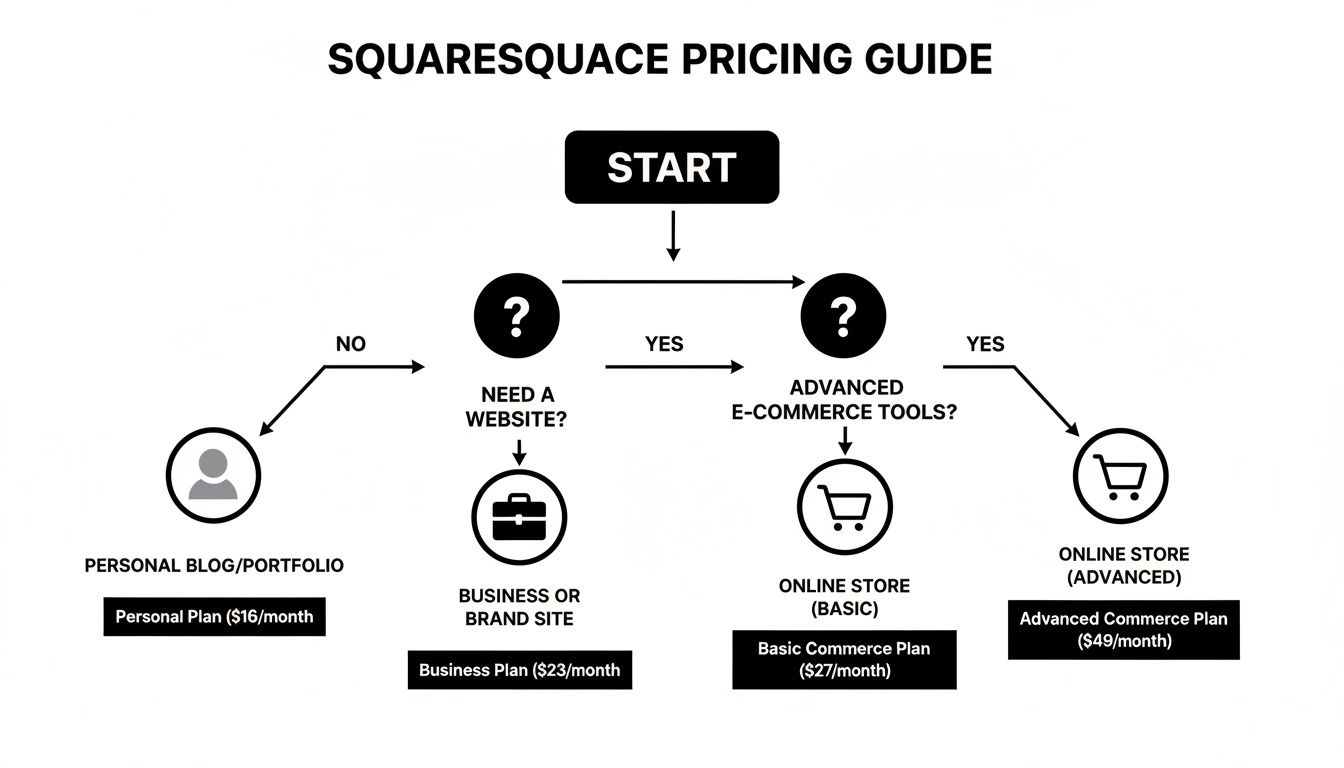
As you can see, Squarespace offers a clear path as your needs grow. But its all-in-one nature is the key thing to consider for long-term scalability. That’s the fundamental difference: Squarespace gives you a streamlined path within its walls, while WordPress offers infinite paths, but you have to build the road yourself.
Knowing When Your Business Has Outgrown Squarespace
Every growing business hits a point where the tools that got them started just can't keep up. While Squarespace is brilliant for getting a beautiful website off the ground, there will likely come a time when your success demands more power and customisation.
Recognising you’ve hit the limits of Squarespace isn't a problem—it’s a great sign. It means you're succeeding.
Think of it like moving house. You started in a stylish, pre-designed apartment that was perfect for getting set up quickly. But now, your needs have grown, and it's time to build a custom home designed specifically for you.
You're ready to graduate from a tool that helps you start a business to a platform that can scale with your business, whatever the future holds.
Identifying the Common Growing Pains
So, how do you know when you've hit the ceiling? The signs often start as minor frustrations before they become serious roadblocks for your operations. If you find yourself nodding along to any of the points below, it might be time to plan your next move.
These growing pains usually show up in a few key areas:
- Complex Integration Needs: You need your website to talk to specialised software that isn't on Squarespace's approved list. Maybe it's a specific Australian logistics partner with custom shipping rules or a bespoke inventory system you rely on.
- Advanced Database Functionality: Your business model now relies on a dynamic, searchable database. A classic example is a real estate agency needing to manage thousands of property listings, or a recruitment firm with a massive database of jobs and candidates.
- Complete SEO and Technical Control: You're in a tough market and need every SEO advantage you can get. This could mean implementing advanced schema, having granular control over your site's structure, or making technical tweaks for Core Web Vitals that go beyond what a template system allows.
Essentially, you've moved past needing a simple online brochure. You now need a powerful business tool that's deeply woven into how you operate.
When Your Ambition Needs a Custom Solution
Outgrowing Squarespace means you're ready to invest in a digital asset that is truly your own—one that isn't held back by the rules of a closed platform. This is the point where working with a professional agency becomes a strategic move, not just another cost.
Moving beyond a platform like Squarespace is the moment a business decides to stop fitting its operations into a box and instead builds a custom solution designed to break barriers and unlock new opportunities for growth.
An experienced agency can guide you through this transition. Instead of fighting with workarounds, you can build a custom solution on a more flexible platform like WordPress. This opens up a world of possibilities:
- Build Custom API Connections: Seamlessly connect with any software critical to your Australian business, from local payment gateways like eWay to specialised CRM systems.
- Create Powerful Web Applications: Develop unique, database-driven features for your customers. This could be a custom booking system or a client portal, creating a real competitive advantage.
- Achieve Unmatched Scalability: Build a robust digital foundation that can handle huge spikes in traffic, complex ecommerce operations, and future growth without breaking a sweat.
This isn’t just about getting a new website. It's about commissioning a core business asset that is built to evolve with you, improve efficiency, and help you reach your biggest goals.
Still Got Questions About Squarespace?
Even after all that, you might have a few specific questions floating around. That’s completely normal. When we talk to Aussie businesses about Squarespace, a few common queries always pop up. Let’s tackle them head-on.
Can I Use My Own Domain Name with Squarespace in Australia?
Yes, you absolutely can. If you've already got a domain name from a registrar like GoDaddy or even an Australian provider, you can easily point it to your new Squarespace site. Their help guides are pretty clear and walk you through the settings you need to change.
Alternatively, you can just register a new domain directly through Squarespace. They often throw in the first year for free if you sign up for an annual plan, which makes the whole process neat and tidy.
Is Squarespace Good for SEO in Australia?
Right out of the box, Squarespace gives you a solid foundation for search engine optimisation (SEO). It automatically takes care of a lot of the technical stuff, like creating a sitemap and making sure your site works beautifully on mobile phones. You can also easily customise your page titles and meta descriptions, which is crucial.
For many local Aussie businesses, freelancers, and creatives, these built-in tools are more than enough to start ranking in local search results without needing to become an SEO guru overnight.
However, if you're aiming to dominate a highly competitive national market or need to get into some really advanced SEO tactics, you might find it a bit limiting. A platform like WordPress simply offers more horsepower and finer control for complex optimisation.
Can You Have Multiple Blogs on One Squarespace Site?
You sure can. Squarespace allows you to create multiple, separate blog pages on a single website. This is a brilliant feature for businesses that cater to different audiences or want to separate different types of content.
Think of a marketing agency, for example. They could have one blog for "Client Case Studies" to show off their work and a completely separate one for "Digital Marketing Tips" to attract new leads. Each blog gets its own home page, keeping everything organised and easy for your visitors to find what they're looking for.
How Difficult Is It to Migrate from Squarespace to WordPress?
This is a big one, and you need to go in with your eyes open. Moving away from Squarespace isn't a simple copy-and-paste job because it's what we call a closed platform. You can export your basic content—blog posts, images, and text—but that's about it. Your site's design, layout, and unique page structures are all left behind.
Migrating to WordPress essentially means a complete rebuild from the ground up. It’s a critical point to consider from the get-go. If you have even a small inkling that you’ll need complex features or plan on scaling significantly down the track, starting on a more flexible platform might save you a major headache later on.
Ready to move beyond the limitations of a template and build a powerful, custom website that truly grows with your business? The team at Website Builder Australia specialises in creating tailored digital solutions. Get in touch with us today to discuss your project.


