

Website Design for Construction: Win More Jobs in 2026
You're probably in one of two positions right now. Either your construction business has grown to the point where the old website is holding you back, or you've never had a proper site and you're tired of relying on referrals alone. In both cases, the same problem usually sits underneath it: your work is solid, but your website doesn't prove it quickly enough.
That matters more in construction than in many other industries. A client isn't buying a low-risk product. They're hiring someone to manage cost, quality, timelines, safety, compliance, and communication. Good website design for construction has to answer that concern before it tries to impress anyone with layout, animation, or clever copy.
Why Your Construction Website Needs to Build Trust Not Just Look Good
A polished website helps. It creates a strong first impression and makes your business look organised. But for a builder, renovator, contractor, or specialist trade, visual polish isn't the main job.
The main job is risk reduction.

In Australia, one of the biggest gaps in construction websites is that they're often designed around appearance rather than the buyer's real question: “How do I know this builder is safe, compliant, and reliable?” That trust gap matters because construction is a high-risk sector, and practical credibility signals like insurance, licensing, and safety records carry more weight for lead generation than a nice-looking portfolio alone, as noted in this construction website analysis.
What clients are actually judging
When someone lands on your site, they're making a fast assessment. Not just of your workmanship, but of whether you look like a business that will return calls, show up prepared, manage risk, and finish what you start.
That's why the usual advice falls short. Large hero images, modern fonts, and a clean colour palette are useful, but they don't answer the hard questions. A construction buyer wants proof.
They look for signs like:
- Licence details: Clear evidence that you're properly licensed for the work you promote.
- Insurance visibility: Public liability, relevant cover, and reassurance that you operate professionally.
- Safety credibility: References to site safety processes, inductions, or compliance standards where relevant.
- Project-specific proof: Real jobs, real locations, real scope, and clear descriptions of what you delivered.
- Contact transparency: A real phone number, business email, and enough detail to feel you're established.
Practical rule: If a visitor has to hunt for proof that you're legitimate, the website is doing the opposite of what it should.
What doesn't work
A surprising number of construction sites still make the same mistakes. They lead with generic claims like “quality workmanship” and “trusted service” without backing them up. They hide trust details on a buried about page. They upload a gallery full of photos with no context, so the visitor can't tell whether the business handled a full build, a fit-out, a renovation, or a subcontract package.
That sort of site can look fine and still lose work.
The problem isn't that the business lacks capability. The problem is that the website asks for confidence before it has earned it.
What trust-led design looks like
A trust-led construction website is more direct. It shows the work, but it also explains the conditions around the work. It makes your operating standards visible. It places trust markers where decision-making happens, especially near enquiry buttons and forms.
A strong homepage should answer four questions fast:
| Client question | What your website should show |
|---|---|
| Who are you? | Clear business identity and service area |
| What do you do? | Specific services, not broad slogans |
| Can I trust you? | Licences, insurance, testimonials, project proof |
| What do I do next? | One obvious next step such as call or quote request |
If you get that right, the design starts working like a sales tool instead of a brochure.
A construction website shouldn't just say you do good work. It should make a cautious buyer feel safer contacting you.
Laying the Foundation Strategic Planning for Your Website
Most website problems start before design starts. The owner hires a designer, asks for something modern, sends over a logo and a few photos, and hopes the rest sorts itself out. That usually creates a site that looks acceptable but doesn't support enquiries properly.
Strategic planning fixes that.
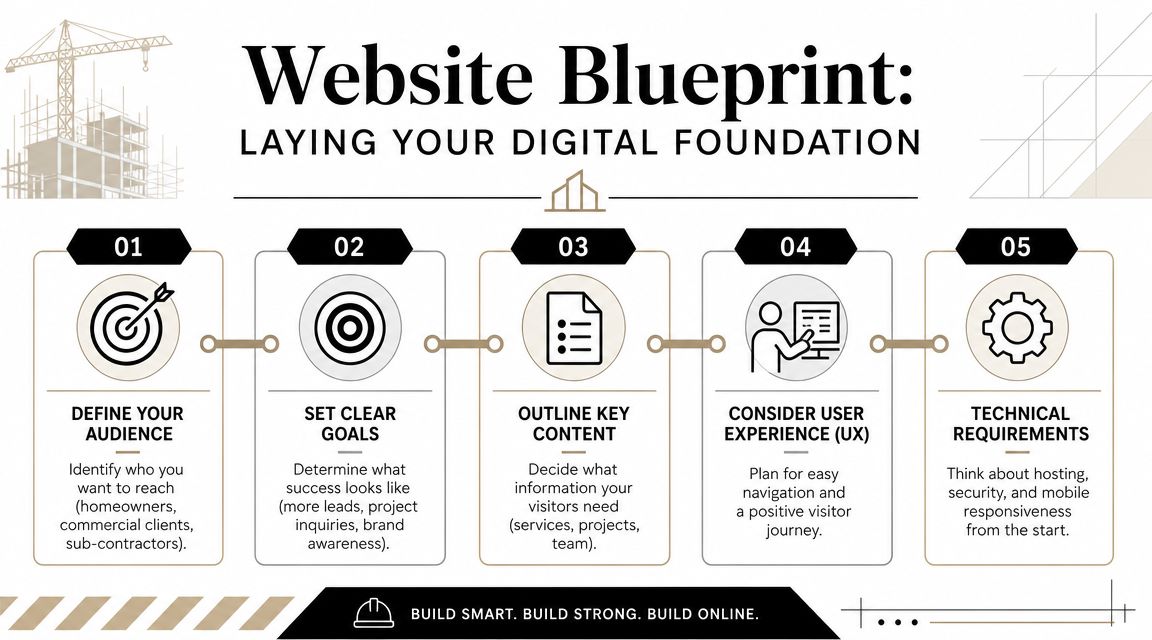
Construction visitors don't spend long deciding whether to stay. According to Autodesk's construction industry statistics, construction website bounce rates range from 21.95% to 48.76%, averaging around 36%, while visitors spend an average of 2 minutes and 46 seconds on site and view 2.46 pages per visit. That's a short window to explain your services, prove credibility, and move someone toward an enquiry.
Start with the business goal
Not every construction website has the same job. A small residential builder needs a different structure from a commercial contractor, and both need something different from a trade business trying to win local service enquiries.
Write down the primary purpose before you discuss design.
For most businesses, it will be one of these:
Lead generation for new work
The site needs service pages, project proof, clear contact paths, and strong trust signals.Tender and capability support
The site needs credentials, team profiles, systems, compliance detail, and a more formal project library.Recruitment support
The site should show company culture, current work, team standards, and an easy way to apply.
If you try to make one website do all three equally, it usually becomes vague.
Define who you want more of
A lot of builders say, “We work with anyone.” Online, that creates weak messaging. A homeowner looking for a renovation and a developer looking for a contractor don't want the same information in the same order.
Map your key audience types and note what each one cares about most.
- Homeowners: reassurance, communication, cleanliness, process, examples of similar jobs
- Commercial clients: capability, reliability, documentation, systems, project coordination
- Developers or consultants: credentials, delivery track record, project detail, professionalism
- Subcontractors or job seekers: team standards, workflow, and contact clarity
Once you know the audience, your page order becomes easier. You stop guessing what should go above the fold and what can sit lower on the page.
Decide what the first click should be
A useful planning exercise is to ask this question: when the right client lands on the homepage, where should they click first?
That single answer shapes the homepage layout. If the answer is “view our renovation projects,” the homepage should route people there. If the answer is “request a quote,” the contact pathway should be visible immediately. If the answer is “see our commercial capabilities,” that option needs to be obvious.
Don't build the homepage as a summary of everything. Build it as a routing page to the most important proof.
Scope the content before design
Construction businesses often underestimate content. A proper website needs more than a home page and a contact form. It needs written service descriptions, project details, business credentials, team information, FAQs, and polished photography.
Before design begins, prepare a basic content list:
- Core pages: home, about, services, projects, contact
- Trust content: licences, insurance, certifications, testimonials
- Commercial proof: sectors, process, capability statements if relevant
- Local relevance: suburbs, regions, or cities you serve
- Media assets: project photos, team shots, logo files
This planning stage saves money. It reduces revisions because everyone knows what the site is meant to do before anyone starts choosing fonts or page layouts.
Designing Your Digital Showroom Essential Pages and Features
A construction website should feel less like an online brochure and more like a well-run site office. Every page should have a purpose. Every section should move the visitor closer to confidence.
The structure matters as much as the design.
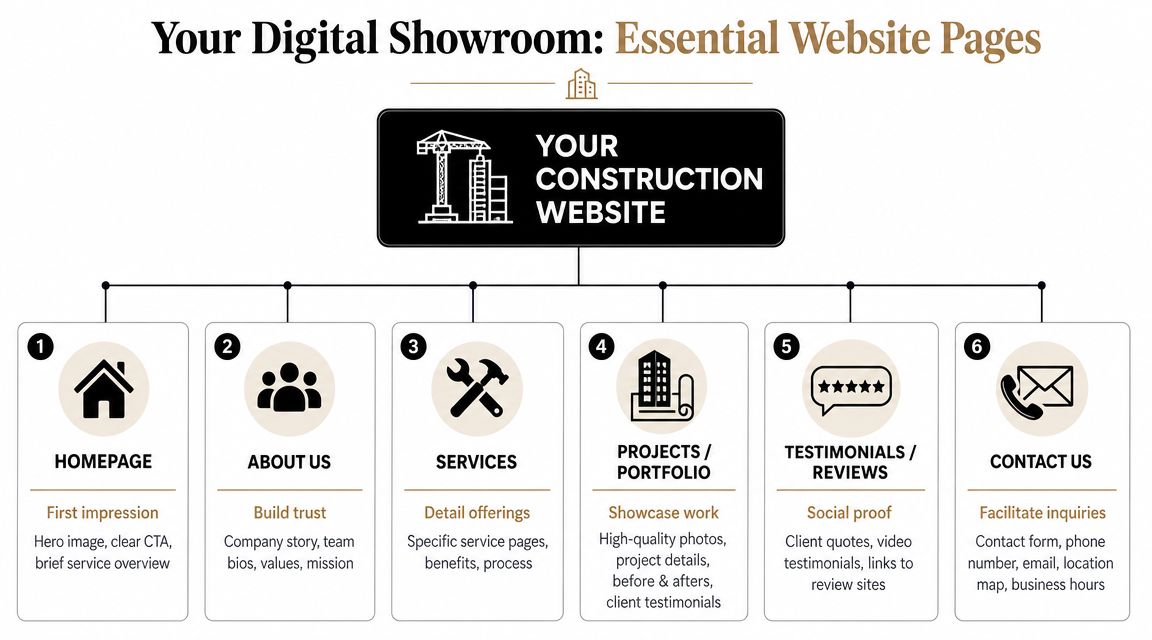
For high conversion, construction websites work best when each project has its own page, service pages are specific, a persistent quote-request call to action stays visible, and mobile users can access a tap-to-call header. Strong performance targets also matter, including LCP under 2.5 seconds, with the homepage focused on routing visitors to proof and enquiry paths rather than cramming in generic content, according to construction website design best practices.
The pages you actually need
A small business doesn't need dozens of pages at launch. It does need the right pages.
| Page | What it should do |
|---|---|
| Homepage | Direct visitors to relevant services, projects, and contact actions |
| About | Show who runs the business, how you work, and why clients trust you |
| Services | Explain each service clearly and specifically |
| Projects | Prove capability with individual project pages |
| Testimonials | Reinforce credibility with real client feedback |
| Contact | Remove friction and make it easy to enquire |
The strongest websites in this category don't rely on a single “portfolio” page full of photos. They break work into separate pages so each project can support a search query, a sales conversation, or a follow-up link in an email.
Build project pages like proof, not decoration
A project page should do more than display images. It should answer practical questions.
Include:
- Project type: custom home, extension, fit-out, commercial works, remedial work
- Location: suburb or region where appropriate
- Scope: what your team delivered
- Constraints: access, staging, live-site conditions, timeline pressure, compliance needs
- Visual evidence: high-quality photos with context
- Outcome: what changed for the client or site
That page structure helps two audiences at once. Prospective clients can see that you've handled similar work, and search engines can understand what the page is about.
If you want to see a related approach designed for trade businesses, this guide on web design for tradies is a useful comparison point.
Service pages need to be specific
One “Services” page isn't enough if you offer different types of work. A broad list creates weak relevance and forces visitors to dig.
Separate pages work better for things like:
- home renovations
- bathroom renovations
- commercial fit-outs
- shopfitting
- custom homes
- deck and outdoor structures
- office refurbishments
Each service page should state what you do, who it suits, where you work, and how to enquire.
Place trust signals where decisions happen
A common mistake is storing licence and insurance information on the about page and assuming people will find it. They often won't.
Put trust signals:
- near contact forms
- beside quote-request buttons
- in the mobile contact header where space allows
- on project pages where risk concerns are highest
- on service pages for regulated or higher-stakes work
If someone is ready to enquire, that's the exact moment they want reassurance.
Building the Structure Technical Choices and Mobile Experience
A construction website can have strong branding and solid copy, but if it's awkward on mobile, slow to load, or hard to update, it becomes a liability. Owners feel that pain later. Staff avoid updating it, leads get lost, and the site slowly goes stale.
The technical setup should support the business, not trap it.
Choose a platform you can actually live with
For most construction businesses, a practical content management system is the right choice because it lets you add projects, update service areas, and publish news without rebuilding the site each time. That matters because construction websites tend to grow in stages. You launch with core pages, then add project proof, staff profiles, capability material, and service detail over time.
The wrong setup is one that only a developer can edit comfortably. That usually leads to delays, outdated information, and an enquiry path that falls behind the business itself.
A useful benchmark when discussing options with developers is flexibility. Can your team add a new project page without breaking the layout? Can someone update contact details or swap testimonials without opening a support ticket? If not, the system may be too rigid.
Mobile design is now the default
Many construction clients search while they're moving, between meetings, or standing on a site. That makes mobile usability a commercial issue, not just a design preference.
Broader web design research shows that 94% of first impressions are influenced by web design, and by 2025 90% of all websites worldwide had implemented responsive design, according to Hostinger's web design statistics. For construction businesses, that means a mobile-friendly layout isn't optional. It's the baseline people already expect.
A weak mobile experience usually shows up in familiar ways:
- text that's cramped or oversized
- phone numbers that aren't easy to tap
- menus that hide important service pages
- galleries that load badly on slower connections
- forms that are annoying to complete on-site
Hosting, performance, and media handling
Construction websites often rely heavily on photography, and that creates a trade-off. Large images help sell workmanship, but oversized files can drag down the whole site.
That's why performance decisions matter early. A developer should think about image sizing, caching, layout stability, and how scripts are handled before the design is approved. If you use project videos, site cameras, or live feeds, it also helps to understand how streaming methods differ. This explainer on what is RTSP protocol is useful background if your business ever needs to integrate surveillance or real-time video viewing into broader digital systems.
For businesses reviewing responsive layouts or planning a rebuild, this reference on mobile web page design is worth a look. It outlines the sort of mobile-first thinking that suits construction buyers who need information fast.
A construction website doesn't need fancy tech. It needs dependable tech that loads quickly, looks right on a phone, and stays easy to maintain.
One practical option in the Australian market is Website Builder Australia, which offers website design, WordPress development, hosting, and ongoing maintenance. That kind of bundled setup can suit businesses that want one provider handling both the build and the day-to-day upkeep.
Attracting Local Clients SEO and Content Strategy for Tradies
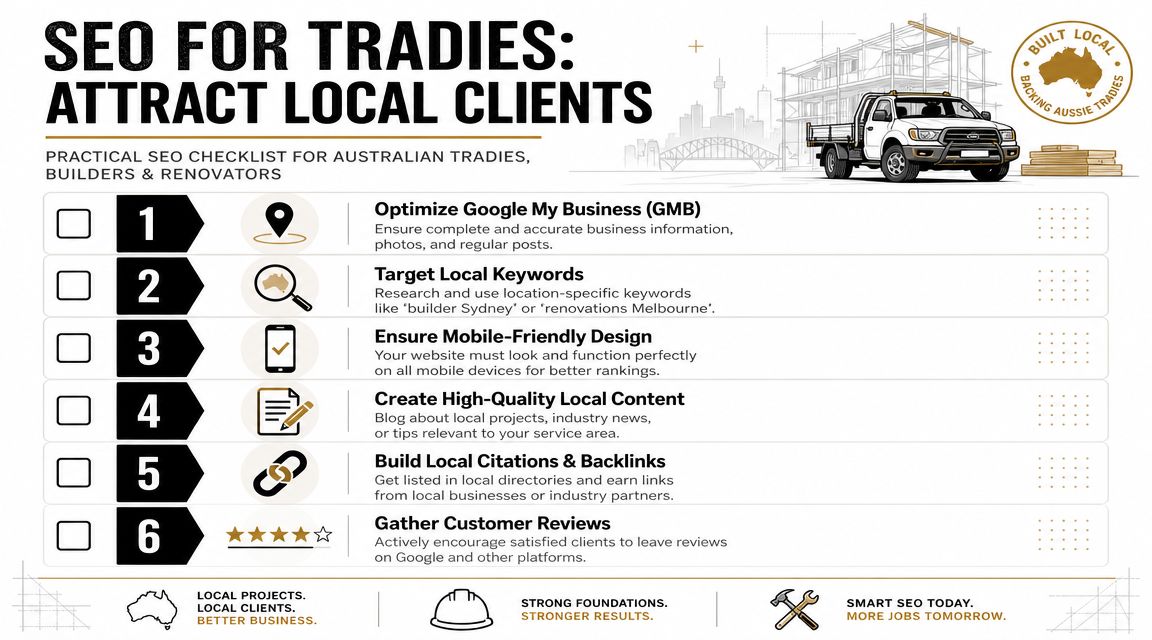
A well-built site still needs visibility. If your business depends on local work, SEO should focus on showing up for the right suburbs, service types, and intent-driven searches, not on publishing random blog posts for the sake of activity.
Local search works best when your website and your reputation support each other.
Start with commercial intent
Construction SEO is usually strongest when each service and location pairing has a clear home. Instead of trying to rank one generic page for everything, build pages that match what people search for.
Examples include service-location combinations such as a renovation builder in a specific city, a commercial fit-out contractor in a local area, or a deck builder servicing a defined region. That gives search engines clearer relevance, and it gives visitors a page that feels directly aligned with their job.
The content on those pages should stay practical. Explain what you do, where you do it, what kinds of projects you take on, and how someone can contact you.
Trust signals help rankings and conversions
Construction buyers don't separate SEO from trust as neatly as marketers do. The same details that help a person feel safer can also strengthen your site's credibility.
Trust signals should be treated as technical requirements. That includes prominent licences, insurance details, and real testimonials, plus mobile usability choices such as thumb-friendly controls around 44 x 44 px and body text around 14 px minimum on mobile. Placing these trust markers near enquiry points helps reduce perceived risk and improve lead conversion, according to construction web design guidance focused on trust and mobile usability.
That matters for SEO because better pages tend to be clearer, easier to use, and more convincing once people arrive.
Here's a short explainer that complements the same idea:
The content that actually helps
Many tradies overcomplicate content strategy. You don't need to become a publisher. You do need content that supports sales.
Useful content types include:
- Project write-ups: individual jobs with scope, location, photos, and constraints
- Service pages: one page per meaningful service
- FAQ content: answers to real client concerns about process, timing, inclusions, and approvals
- About and credentials pages: information that proves experience and legitimacy
- Review integration: real client feedback in relevant places across the site
The best SEO page for a builder often reads like a confident sales conversation, not a keyword dump.
If you want a more focused breakdown for this industry, this guide on SEO for construction companies covers the practical side well.
Local SEO checklist that isn't fluff
Use this as a working list:
- Keep business details consistent: Your business name, phone, and location details should match across your site and business profiles.
- Build pages around real services: Don't force unrelated keywords onto one page.
- Publish project proof regularly: Fresh examples help both search visibility and buyer confidence.
- Ask for reviews after handover: Good work needs to become visible proof.
- Connect trust to action: Put credentials near forms, not hidden in the footer.
The Final Inspection Your Launch and Maintenance Checklist
Launching a website feels like the finish line, but for a construction business it's closer to practical completion than final handover. Once the site is live, it has to keep doing the work. It has to stay secure, current, and easy for prospects to use.
That doesn't require a full-time tech team. It does require a simple operating routine.
Pre-launch checks that catch expensive mistakes
Before the site goes live, test it as if you were a cautious client with no background knowledge about your business. Click every major path. Call every phone number. Submit every form.
Use a checklist like this:
- Contact forms: Submit every form and confirm the enquiries arrive in the right inbox.
- Tap-to-call actions: Test on an actual mobile phone, not just a desktop preview.
- Project pages: Check that every gallery, caption, and internal link works.
- Trust details: Confirm licences, insurance references, and testimonials are current and placed correctly.
- Core page review: Read headings and body copy for clarity, spelling, and duplicated text.
- Speed and layout: Check that pages load cleanly and don't jump around while images load.
- Analytics and tracking: Make sure enquiry actions can be measured.
- Legal basics: Privacy policy, terms where relevant, and business contact details should be present.
A missed form setup can cost leads from day one. A broken mobile header can do the same.
Maintenance is asset protection
Construction owners often update trucks, tools, software, and insurances on schedule. The website should be treated the same way. It's part of your operating system now.
A sustainable maintenance routine usually includes:
| Task | Why it matters |
|---|---|
| Software updates | Reduces security and compatibility issues |
| Backups | Protects the site if something breaks |
| Form testing | Confirms leads are still being delivered |
| Content updates | Keeps services, staff, and project proof current |
| Image review | Stops galleries becoming dated or irrelevant |
| Security checks | Helps detect issues before they affect visitors |
You don't need to touch every part every week. You do need someone responsible for checking it consistently.
Measure what matters to the business
A construction company doesn't need a complicated dashboard full of vanity metrics. Track the actions that relate to enquiries and sales conversations.
Focus on questions like:
- Are quote requests coming through?
- Are people calling from the website?
- Which service pages lead to the best enquiries?
- Which project pages get used most in sales conversations?
- Are local search terms bringing in the right kind of traffic?
A website is working when it helps you win the right jobs, not when it simply gets compliments.
The best construction websites age well because they're built around trust, proof, and usability. If the site keeps reflecting how your business operates, it won't just look current. It will keep helping clients choose you with less hesitation.
If you're planning your first serious construction website, or rebuilding one that no longer reflects your business, Website Builder Australia can help with design, WordPress development, hosting, and ongoing maintenance for Australian businesses that need a practical, lead-focused site.


